
Magento 2 Reporting Pro User Guide
Default Magento reports rarely answer the questions merchants actually ask. This guide shows how Towering Media Magento 2 Reporting Pro ($259) turns order data into dashboards, customer-level insights, exportable grids, and segment-ready views—plus install overview, admin setup, rebuild tips, FAQ, and where to buy.
There is no separate wiki page for this module yet—this CMS guide is the primary how-to. Product details, pricing, and add-to-cart live on the Magento 2 Reporting Pro page. Browse the rest of the suite in Analytics & Integrations.
Table of Contents
- Why Default Magento Reports Fall Short
- What Reporting Pro Solves
- Key Capabilities
- System Requirements
- Installation Overview
- Setup Overview in Admin
- Dashboards & Customer Insights
- Exports & Custom Report Builder
- Troubleshooting
- Frequently Asked Questions
- Related Extensions & Resources
- Get the Extension
Why Default Magento Reports Fall Short
Out of the box, Magento’s Reports menu is useful for a quick pulse check—but it is rarely enough for marketing, merchandising, or retention work:
- Generic sales totals — hard to see which products matter per customer, not just store-wide
- Limited customization — columns, filters, and business-specific slices are constrained
- Export friction — pulling clean CSVs for campaigns or offline analysis wastes time
- Weak decision support — KPI comparisons, RFM-style segments, and category-aware performance are missing or scattered
sales_order tables into spreadsheets every Monday, Magento’s default reports are not answering the business questions.
What Reporting Pro Solves
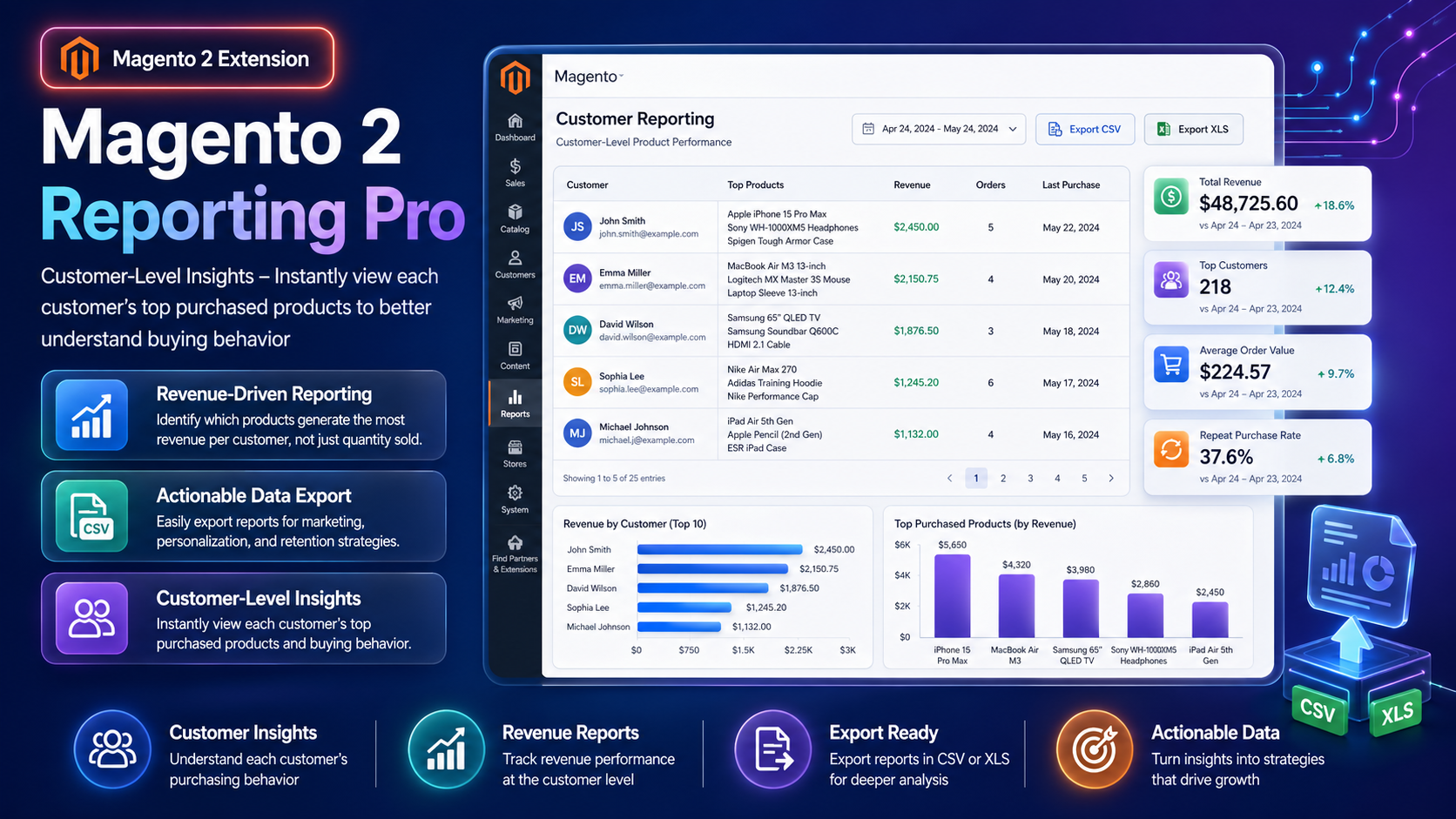
Magento 2 Reporting Pro is an admin-first customer intelligence and merchandising insight platform. It builds aggregate read models from Magento orders, then surfaces dashboards, grids, charts, and exports you can act on—without scanning millions of fact rows in the request path.
- Customer-level insights: top purchased products and revenue contribution per shopper
- Dashboard KPIs with year-over-year style comparison windows
- Operational reports (sales detailed, product performance, manufacturer, loyalty ranking, and more)
- CSV / Excel XML exports aligned to what you filtered on screen
- Custom Report Builder for saved definitions (date ranges, period grouping, guest orders)
- Configurable counted order statuses and customer segmentation settings
- Hyvä-compatible storefronts (admin module; no storefront JS dependency)

Key Capabilities
- Dashboard — revenue, orders, AOV, items, customers, new vs returning, top customers/categories, charts
- Shared date presets — Today, Last 7 Days, Month to Date, Year to Date, Custom, and more
- Period grouping — day, week, month, quarter, year
- Product Performance — configurable parents rolled up, or SKU View for every child SKU (PO-friendly)
- Sales Detailed — one row per order with Extento-shaped export columns
- Customer Loyalty Ranking — lifetime-oriented ranking with group and first-ordered context
- Custom Report Builder — create, duplicate, and edit saved report definitions
- ACL-aware exports — roles only export reports they are allowed to see
- Open Source & Adobe Commerce Magento 2.4.x
System Requirements
- Magento: 2.4.4 – 2.4.7+ (Open Source & Adobe Commerce)
- PHP: 8.1, 8.2, or 8.3
- Towering Media Composer repository credentials
- Working Magento cron (recommended for ongoing aggregate refresh)
- Admin roles with Reporting Pro ACL resources as needed
General Composer install steps for Towering Media modules: Installation guide.
Installation Overview
Step 1: Authenticate Composer
Add your Towering Media credentials to auth.json in the Magento root (same pattern as other Towering Media extensions).
Step 2: Require the package
composer require toweringmedia/module-reporting-proStep 3: Enable and upgrade
php bin/magento module:enable Toweringmedia_ReportingPro
php bin/magento setup:upgrade
php bin/magento setup:di:compile
php bin/magento setup:static-content:deploy -f
php bin/magento cache:flush
Exact module enable name matches the package’s registration.php / module.xml—confirm after install. Production stores should follow your normal deploy process (compile + static content as needed).
Need help installing? Contact Towering Media or browse more modules in Magento 2 Extensions.
Setup Overview in Admin
- Log in to Magento Admin.
- Open Stores → Configuration → Towering Media → Reporting Pro.
- Review Counted Order Statuses — decide which statuses every report should include (including custom statuses).
- Review Customer Segmentation defaults (corporate keywords, large-order rules, At Risk days, RFM bands). Defaults describe a small retailer—tune before relying on segments.
- Save Config, then flush cache.
- Build aggregates (CLI), for example:
php bin/magento reportingpro:rebuild php bin/magento reportingpro:status - Confirm admin users have the correct Reporting Pro resources under System → User Roles → Role Resources.
reportingpro:status.
Dashboards & Customer Insights
Open the Reporting Pro admin menu to reach the dashboard and report grids. An untouched dashboard toolbar typically compares KPIs to the same calendar dates last year; you can switch to previous-period or custom comparison windows.
- KPI tiles — revenue, orders, average order value, items sold, customers, new and returning customers, categories with sales
- Lists & charts — top customers, top categories, revenue/orders time series that match the active filters
- Customer-level product views — see which products each customer buys most (quantity) and which drive the most revenue
Use these views to power retention campaigns, targeted promotions, and merchandising decisions that generic “best sellers” lists miss.
Exports & Custom Report Builder
Most fixed report grids export as CSV or Excel XML with the same columns, filters, sort, date window, and grand totals you see on screen. Sales Detailed is the exception: export writes the full Extento-shaped order dump, not only the shorter on-screen column set.
- Export buttons live on each authorized report grid
- Custom Report Builder keeps its own CSV endpoint and reuses the definition’s filtered query
- Seeded starter reports are read-only—duplicate them before editing
- Scheduled emailed exports are not part of the current ship set; use on-demand export for campaigns and offline analysis
Need accounting synchronization alongside Magento analytics? Use the Magento 2 QuickBooks Online Connector with the QuickBooks connector user guide.
Troubleshooting
Dashboard or grids look empty
- Confirm
reportingpro:rebuildcompleted successfully - Widen the Date Range preset (Year to Date may miss stores whose last orders are older)
- Check Counted Order Statuses—cancelled/pending-only filters can zero out results
- Verify the admin role has ACL access to that report
Numbers look inflated by category
- Category-keyed fact rows can repeat a line once per category. Prefer manufacturer / product performance / order-level reports when you need un-duplicated totals
Rebuild seems stuck or overlapping
- Rebuild and the periodic refresh share a process lock—overlaps skip cleanly
- Use
php bin/magento reportingpro:statusfor live phase/progress
Export fails or is missing
- Confirm the role can view that report (export uses the same ACL)
- Retry with a narrower date window on very large datasets
Still stuck? Contact support with Magento version, PHP version, and a short description of the report + date range you expected.
Frequently Asked Questions
What problem does Reporting Pro solve?
It gives merchants clearer sales, customer, and product insight than Magento’s default reports—especially customer-level product affinity, exportable grids, and dashboard KPIs.
Can I export reports?
Yes. Grids typically export CSV and Excel XML. Sales Detailed exports a fuller order dump suitable for offline parsers.
Does it support multi-store?
Yes. Filter and analyze by website / store scope according to Magento’s store structure and report toolbars.
Is it Hyvä compatible?
Yes. Reporting Pro is an admin analytics module and does not depend on Luma or Hyvä frontend templates.
Where is the documentation?
This CMS page is the primary user guide (wiki page not published yet). General Composer install: Installation. Product details: Reporting Pro PDP.
How much does it cost?
$259 for Magento 2 Reporting Pro (see current pricing and license options on the product page).
Related Extensions & Resources
Want our Magento team to handle it?
Towering Media installs, configures, and customizes Reporting Pro for Magento 2 stores — along with ongoing Magento maintenance, admin tooling, email deliverability, and reporting.
Get the Extension
Stop guessing from thin Magento reports. Dashboards, customer-level product insights, and exportable grids—built for Magento 2 merchants who need decisions, not spreadsheets.
Explore the category: Analytics & Integrations.