
Magento 2 SMTP Extension
See Magento 2 SMTP Extension in action
A short walkthrough of the storefront and admin, built from real screenshots.
Authenticated Magento email delivery
- Any SMTP Host Gmail, SES, SendGrid+
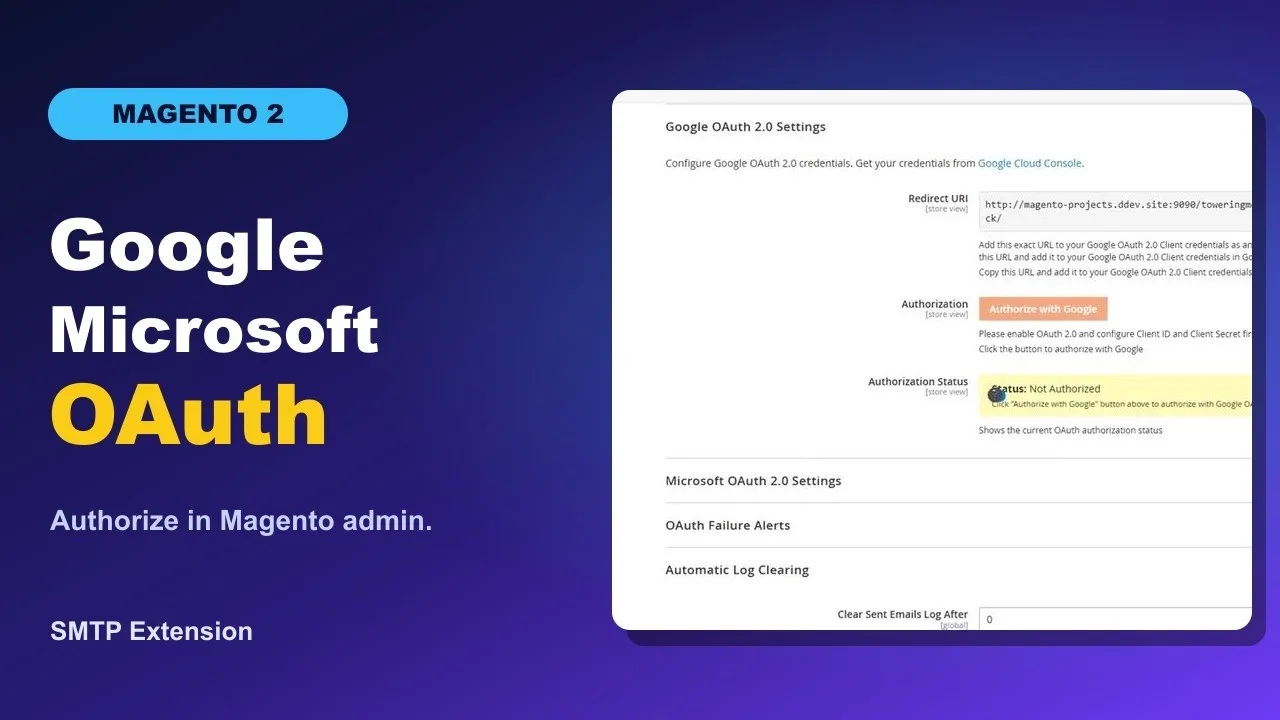
- OAuth Options Google and Microsoft
- Email Log History and previews
- Test Send Verify before go-live




Reliable authenticated email
Default Magento email can be unreliable, land in spam, and give little failure visibility. Toweringmedia SMTP routes mail through authenticated providers with logging, test send, and modern OAuth options.
- Presets for Gmail, SES, SendGrid, Office 365, or custom
- TLS/SSL with Login, Plain, CRAM-MD5, or OAuth
- Google XOAUTH2 and Microsoft OAuth support
- Admin email log with content preview and debug mode
- Send test email from the configuration panel
Built for your store
Fits Magento 2.4.x stores that need provider flexibility, staging controls, and store-view scoped SMTP settings.
- Works with Magento 2.4.x Open Source & Adobe Commerce
- PHP 8.1–8.5 compatible
- Configure under Toweringmedia SMTP Email Settings
- Disable delivery for staging and optional blacklist
- Works with Magento’s email queue and Hyvä storefronts
How It works
See It In Action
Magento 2 SMTP Extension
Stop Losing Orders to Email Delivery Failures. Configure SMTP in Minutes.
The Toweringmedia SMTP Extension for Magento 2 replaces the unreliable PHP mail() transport with a hardened, authenticated SMTP connection. Order confirmations, password resets, shipping notifications, and all other transactional emails reach inboxes—not spam folders—regardless of your hosting provider.
Connect any SMTP service in minutes: Gmail, G Suite, Outlook 365, SendGrid, Mailgun, Amazon SES, Zoho, or a self-hosted mail server. Supports both classic username/password auth and modern OAuth2/App Password methods so your store stays compliant as providers phase out legacy credentials.
Also on Adobe Commerce Marketplace.
Broad Provider Support
Any SMTP Server, Any Provider — One Admin Panel
Configure your SMTP host, port, encryption protocol (TLS or SSL), and credentials in a single Magento admin section at Stores → Configuration → Toweringmedia → SMTP. Pre-configured templates for popular providers fill in the technical fields automatically—choose Gmail from a dropdown and only the credentials remain to enter.
For Amazon SES users, the extension supports IAM key/secret auth alongside standard SMTP credentials. SendGrid and Mailgun API key authentication is also supported, so you can use their SMTP relay without managing dedicated IP whitelists on your own server.
- ✓ Gmail / Google Workspace (App Passwords + OAuth2)
- ✓ Microsoft Outlook / Microsoft 365
- ✓ Amazon SES (SMTP relay + IAM credential support)
- ✓ SendGrid, Mailgun, Postmark, SparkPost
- ✓ Zoho Mail, Yahoo Mail, custom SMTP servers
- ✓ Ports 25, 465, 587 — any custom port supported
Logging & Debugging
Diagnose Email Issues Without Touching a Server Log
Every outgoing email is captured in a built-in admin email log accessible at Marketing → SMTP → Email Log. Each log entry records the recipient, subject line, send timestamp, delivery status (sent / failed), the full body HTML, and any SMTP error message returned by the server.
When configuration problems occur, you see the exact SMTP handshake error—connection refused, authentication failed, TLS negotiation error—directly in the Magento admin. A Test Send button lets you verify credentials and routing to any recipient before going live, with no need for SSH access or reading raw mail logs.
- ✓ Full email log with subject, recipient, status & body
- ✓ Precise SMTP error messages — no vague failures
- ✓ Test Send to any address from admin
- ✓ Log retention period configurable (7–365 days)
- ✓ Manual log purge from admin UI
Multi-Store & Security
One Extension. Every Store View. Sender Reputation Protected.
Multi-store Magento installations can configure a separate SMTP server per store view—your EU store uses a regional SES endpoint while your US store routes through Gmail. Each store view can have independent sender name, reply-to address, and credentials.
Authenticated SMTP delivery significantly improves SPF, DKIM, and DMARC alignment because emails originate from a relay your domain explicitly authorizes. Combined with TLS encryption, this protects both message content in transit and your sender reputation with inbox providers.
- ✓ Per-store-view SMTP server configuration
- ✓ Per-store-view sender name & reply-to address
- ✓ TLS encryption in transit (STARTTLS & TLS)
- ✓ Improves SPF/DKIM/DMARC alignment
- ✓ Compatible with Hyvä, React Checkout Pro & all Magento email types
Compatibility & Technical Specs
Magento Version
2.4.4 – 2.4.7+ (Open Source & Adobe Commerce)
PHP
PHP 8.1, 8.2, 8.3
SMTP Ports
25, 465, 587, custom
Encryption
TLS (STARTTLS), SSL
Hyvä Compatible
Yes — no frontend JS required
Composer
toweringmedia/module-smtp
Works Great With
Frequently Asked Questions
Does the Magento 2 SMTP extension work with Gmail, SendGrid, and AWS SES?
Can I send a test email to verify configuration?
Does it support multiple store views with different SMTP configurations?
Is this SMTP extension compatible with Hyvä themes?
Does it log outgoing emails for debugging?
Key Features
Replace PHP mail() with provider SMTP, OAuth where needed, full outgoing logs, and store-scoped configuration.
- Provider presets Gmail, Office 365, SendGrid, Amazon SES, or custom host and port.
- TLS and SSL Connection security with Login, Plain, CRAM-MD5, or OAuth.
- Google OAuth 2.0 XOAUTH2 for Gmail and Google Workspace without app passwords.
- Microsoft OAuth Microsoft 365 tenant modes with client credentials and refresh tokens.
- Outgoing email log Admin Email Log with content preview and debug mode.
- Send test email Validate host, auth, and encryption from the configuration panel.
- Delivery controls Disable delivery for staging and optional blacklist handling.
- Store-view scope Different SMTP settings per website or store view when needed.
Demo
Docs & Support
📘 Documentation
Get started quickly with our detailed user guide. The documentation covers everything from installation to advanced SMTP configuration.
- Step-by-step installation instructions
- SMTP setup with Gmail, Outlook, Amazon SES, and more
- Email testing and verification
- Error logging and debugging
- Configuration best practices for high deliverability
💬 Support
Need help? Our Magento experts are here to assist you with setup, configuration, and troubleshooting.
- Quick and reliable email support
- Help with installation and SMTP configuration
- Troubleshooting email delivery issues
- Guidance for third-party email providers
- Regular updates and compatibility support
Frequently Asked Questions
The Magento 2 SMTP Extension allows your store to send emails through a trusted SMTP server instead of the default PHP mail function. This significantly improves email deliverability and reduces the chances of emails going to spam folders.
The extension supports a wide range of SMTP providers such as Gmail, Outlook, Amazon SES, and custom SMTP servers. You can easily configure host, port, authentication, and protocol settings directly from the Magento admin panel.
Yes, the extension includes a test email feature that allows you to verify your SMTP configuration before sending real emails. This helps ensure that your setup is correct and emails are delivered successfully.
Yes, it includes detailed email logging and debugging features. You can track all sent emails, check their status, and review content to troubleshoot issues or monitor communication with customers.
Where do I configure SMTP and view the email log?
Go to Stores → Configuration → Toweringmedia → SMTP Email Settings for providers, auth, encryption, and test send. Open Stores → SMTP Email → Email Log to review outgoing mail history.
Does it support OAuth as well as username and password?
Yes. Besides classic login authentication, you can use Google XOAUTH2 and Microsoft OAuth fields when the selected provider and auth method require them. Passwords are stored encrypted.
Do you offer support?
Yes. Email support@toweringmedia.com or call (773) 466-2454. Updates and support continue while your subscription is active.
Can I try a demo?
Yes. Use the View Demo button on this page. For a guided walkthrough, email support@toweringmedia.com.
What happens when I don’t renew?
Uncheck auto-renew at purchase, or cancel later. You keep access until the end of the paid period. After that, updates and support stop.
Technical Specifications
- Magento Version: Compatible with Magento 2.4.x (Open Source & Adobe Commerce)
- PHP Version: PHP 8.1, 8.2, 8.3, 8.4, 8.5 compatible
- Framework: Built using Magento 2 native architecture (no core overrides)
- Installation Type: Composer / Manual installation supported
- Module Dependency: Requires Toweringmedia Base (toweringmedia/module-base)
- Email Protocol: SMTP (Simple Mail Transfer Protocol)
- Authentication: Username/password plus Google XOAUTH2 and Microsoft OAuth 2.0
- Encryption Support: SSL / TLS
- SMTP Providers: Gmail, Outlook, Amazon SES, SendGrid, Mailgun, and others
- Email Logging: Built-in email log and error tracking
- Multi-Store Support: Yes
- Store Scope Configuration: Website / Store View level
- Test Email Feature: Available from admin panel
- Queue Compatibility: Works with Magento email queue system
- Cron Support: Fully compatible with Magento cron jobs
- Admin Configuration Path: Stores → Configuration → Toweringmedia → SMTP Email Settings
- Override Default Mail: Yes (replaces Magento default mail transport)
- Security: Supports secure authentication and encrypted communication
- Performance Impact: Minimal (lightweight implementation)
Compatible with your Magento 2 store
Compatible with Magento 2.4.x (Open Source and Adobe Commerce) and PHP 8.1, 8.2, and 8.3. Requires toweringmedia/module-base. Configure under Stores → Configuration → Toweringmedia → SMTP Email Settings, or Stores → SMTP Email → SMTP Configuration. Works with Magento’s email queue and Hyvä storefronts (transport-layer module).
-
 Magento 2.4.x
Open Source & Adobe Commerce
Magento 2.4.x
Open Source & Adobe Commerce
 Updates & supportKeep your store running smoothly