
Magento 2 Product Image Gallery
See Magento 2 Product Image Gallery in action
A short walkthrough of the storefront and admin, built from real screenshots.
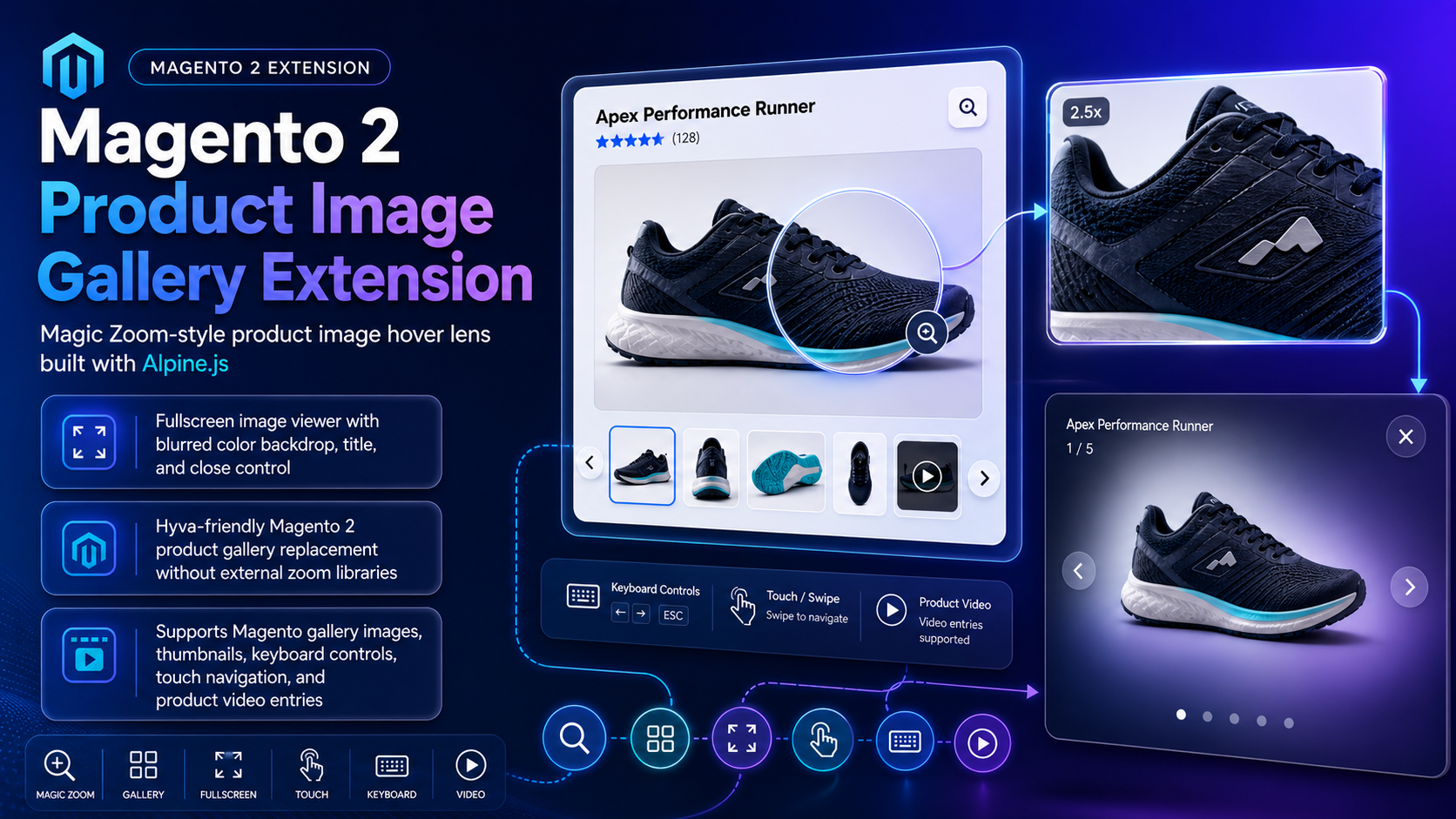
Modern product gallery with Magento-native zoom
- Hover Zoom Desktop overlay magnifier
- Fullscreen Viewer Blurred backdrop modal
- Images & Video YouTube and Vimeo entries
Modern product image gallery
Default Magento galleries feel limited, and many zoom tools rely on heavy third-party libraries. This Alpine.js gallery adds hover zoom, fullscreen viewing, thumbnails, video, and touch navigation without external zoom libraries.
- On-image hover zoom overlay
- Fullscreen viewer with blurred backdrop and title
- Thumbnail strip plus stage previous/next arrows
- Keyboard arrows/Escape and touch swipe navigation
- YouTube and Vimeo Magento product video entries
Built for your store
Hyvä-friendly Alpine.js gallery that also works on Luma, configurable per website or store view.
- Works with Magento 2.4.x Open Source & Adobe Commerce
- PHP 8.1, 8.2, 8.3, and 8.4 compatible
- Hyvä-friendly with Luma containment stylesheet
- Configure under Toweringmedia Product Image Gallery
- Zoom magnification adjustable from 1.0 to 10.0
How It works
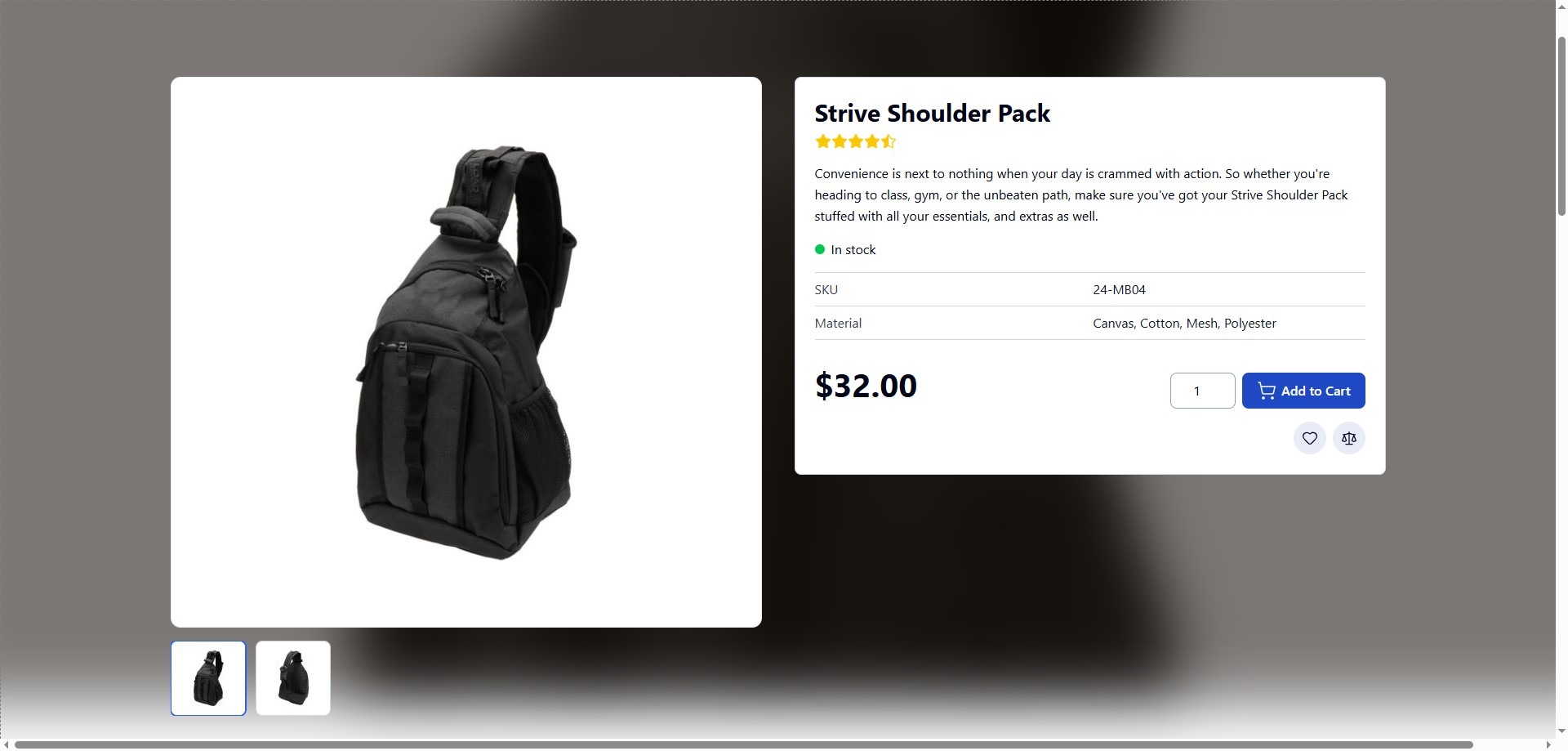
Product Gallery
Modern, Interactive Product Image Gallery for Magento 2
The Magento 2 Product Image Gallery Extension by Toweringmedia enhances your product pages with a modern, interactive, and performance-focused media experience. It replaces the default Magento gallery with a smooth and user-friendly interface designed to showcase product visuals more effectively.
Magento’s default product gallery can feel limited when it comes to delivering a rich visual experience. This extension introduces intuitive navigation with thumbnail browsing, helping customers quickly explore multiple product images with ease.
Fullscreen Experience
Distraction-Free Fullscreen Product Viewing
Customers can open images in a fullscreen popup view to focus entirely on the product. This immersive experience allows users to explore visuals in greater detail without distractions from the surrounding page.
Combined with keyboard and touch navigation, the fullscreen mode ensures a seamless and intuitive browsing experience across all devices.
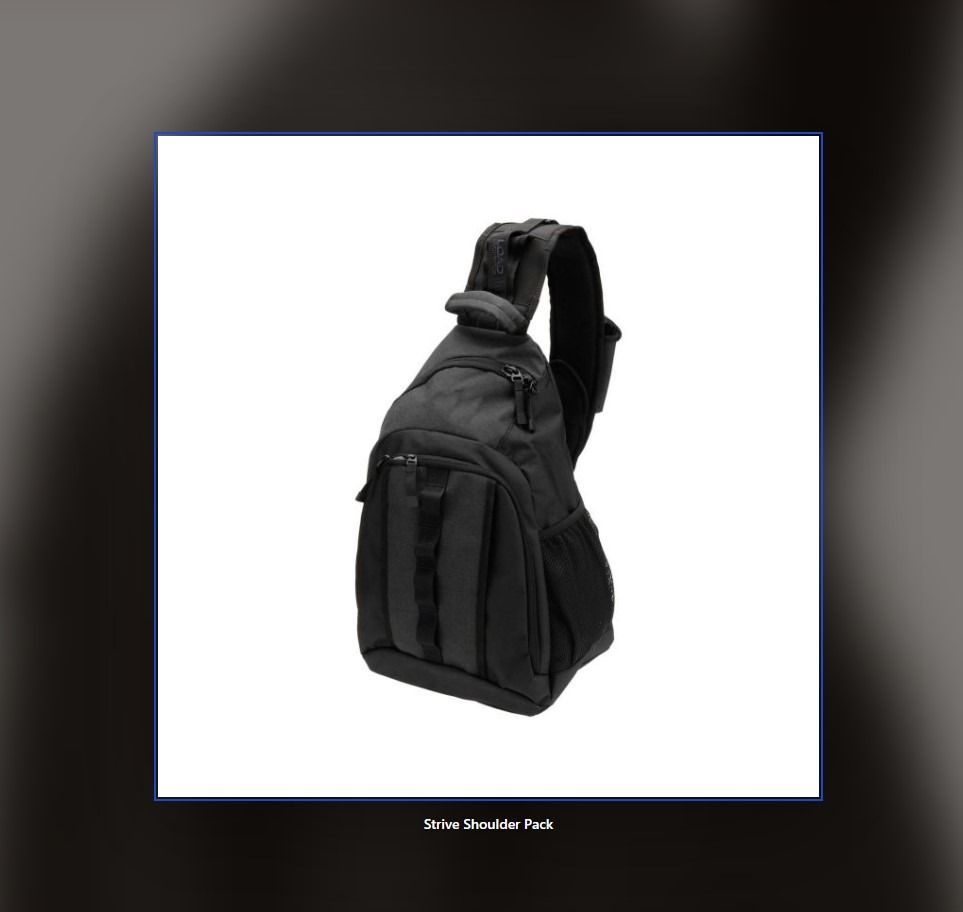
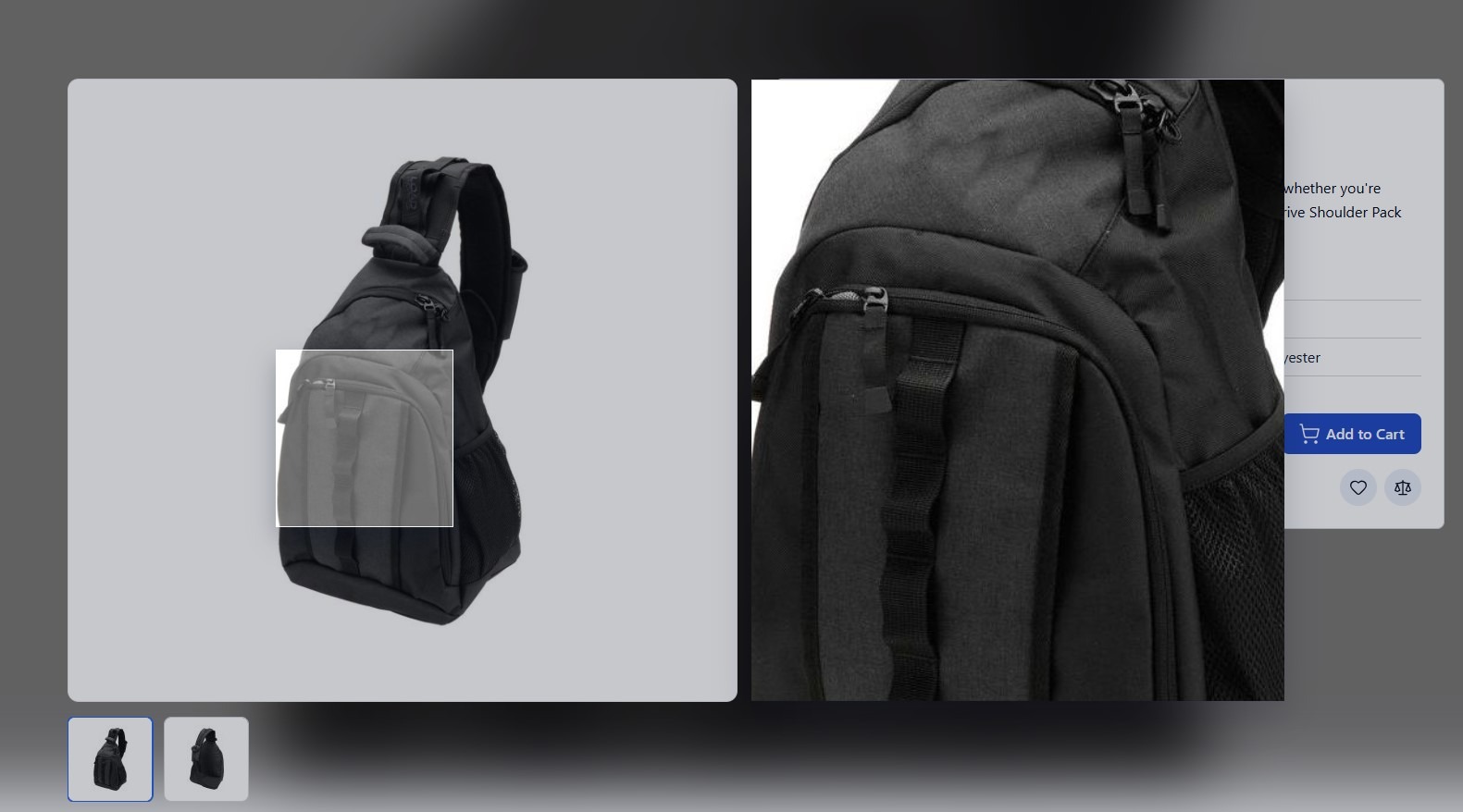
Image Zoom
Precision Zoom for Detailed Product Inspection
The extension includes advanced zoom functionality that allows customers to inspect product details closely. A hover-based zoom lens highlights specific areas while displaying a magnified overlay on the image.
This makes it easier to evaluate textures, materials, and fine details—helping customers make more confident purchase decisions.
Performance & Compatibility
Lightweight, Fast, and Hyvä-Compatible Gallery
Built with modern frontend technologies, the gallery is lightweight and fully compatible with Hyvä themes. It delivers fast load times and smooth interactions without relying on heavy third-party libraries.
The extension also supports both images and videos, allowing merchants to present products in a more engaging and informative way.
Pair rich gallery media with clear merchandising badges using the Magento 2 Product Labels user guide.
Conversion-Driven Experience:
With its clean design, fast performance, and enhanced interactivity, the gallery improves user engagement, builds customer confidence, and helps create a more professional product presentation that can positively impact conversions.
Magic Zoom Replacement
Modern Zoom Experience Built for Hyvä
This extension delivers a powerful replacement for Magic Zoom, offering smooth hover zoom and click-to-enlarge functionality—fully optimized for the Hyvä frontend. It ensures faster load times, improved Core Web Vitals, and a seamless user experience.
Unlike traditional zoom solutions that depend on heavy JavaScript libraries, this module is built using Alpine.js, making it lightweight, fast, and future-ready for modern Magento stores.
Key Features & Capabilities
- Alpine.js Powered: Lightweight and fast performance without jQuery or Knockout dependencies.
- Magic Zoom Replacement: Smooth hover zoom and click-to-enlarge optimized for Hyvä themes.
- Fully Responsive: Works seamlessly across mobile, tablet, and desktop using Tailwind CSS.
- Hybrid Media Support: Combine product images with YouTube/Vimeo videos in one gallery.
- Requires Toweringmedia Base: Shared Towering Media foundation; Alpine.js gallery without jQuery.
Why Switch from Magic Zoom?
Traditional solutions like Magic Zoom Plus were built for older Magento themes and can be difficult to integrate with modern frontends like Hyvä. This extension offers a native, high-performance alternative designed specifically for today’s Magento ecosystem.
Key Features
A Magic Zoom-style Magento 2 product gallery built with Alpine.js for Hyvä and Luma storefronts.
- Desktop hover zoom Configurable magnification overlay kept inside the gallery column.
- Fullscreen lightbox Click-to-open viewer with blurred backdrop, title, and close control.
- Thumbnail navigation Switch gallery items from a thumbnail strip under the main image.
- Stage arrows Previous and next controls overlaid on the main product image.
- Keyboard controls Arrow keys and Escape while the fullscreen viewer is open.
- Touch swipe Swipe left or right on the main image to change slides.
- YouTube and Vimeo Play Magento product video entries in the same gallery.
- Admin toggles Enable zoom, fullscreen, thumbs, and navigation per store view.
Demo
Docs & Support
📘 Documentation
Get started with the polished Magento CMS user guide: install overview, configuration, storefront behavior, troubleshooting, and FAQ.
- Install overview and system requirements
- Admin configuration walkthrough
- Storefront behavior and troubleshooting
- FAQ and related extensions
💬 Support
Need help with install, configuration, or theme integration? Towering Media Magento specialists are ready to assist.
- Installation and go-live assistance
- Configuration and troubleshooting help
- Hyvä / theme integration guidance
- Ongoing Magento compatibility updates
Frequently Asked Questions
The extension replaces the default Magento product gallery with a modern, interactive image viewer. It enhances product pages with features like zoom, fullscreen view, thumbnails, and smooth navigation.
Yes, the extension is fully compatible with the Hyvä theme and is built using lightweight technologies like Alpine.js, ensuring fast performance without relying on heavy JavaScript libraries.
Yes, the gallery supports both product images and videos, allowing you to present products more effectively with richer media content.
No, the extension is lightweight and does not rely on heavy third-party libraries. It uses modern frontend technologies to ensure fast loading and smooth interaction.
Yes, the gallery is fully responsive and optimized for all devices. It supports touch gestures on mobile and provides a seamless viewing experience across screen sizes.
Where do I configure the product image gallery?
Go to Stores → Configuration → Toweringmedia → Product Image Gallery. You can enable or disable the gallery, set desktop hover zoom and magnification, and control fullscreen, stage arrows, keyboard navigation, touch swipe, thumbnails, and the fullscreen title per website or store view.
Does it work on Luma as well as Hyvä?
Yes. The gallery is Hyvä-friendly and uses Alpine.js. Luma storefronts are supported with a separate containment stylesheet so hover zoom stays inside the gallery column.
Can I change the hover zoom magnification?
Yes. Under Desktop Zoom, enable hover zoom and set Zoom Magnification to a value between 1.0 and 10.0. The magnified view stays on the main image so product options and add to cart remain visible.
Technical Specifications
- Magento Version: Compatible with Magento 2.4.x (Open Source & Adobe Commerce)
- PHP Version: PHP 8.1, 8.2, 8.3, 8.4 compatible
- Framework: Built using Magento 2 native architecture (no core overrides)
- Installation Type: Composer / Manual installation supported
- Module Dependency: Requires toweringmedia/module-base
- Frontend Technology: Alpine.js powered lightweight implementation
- Theme Compatibility: Fully compatible with Hyvä theme
- Gallery Features: Zoom, fullscreen view, thumbnails, keyboard navigation
- Media Support: Product images and videos supported
- Responsive Design: Optimized for desktop, tablet, and mobile devices
- Performance: Lightweight and fast-loading (no heavy JS libraries)
- Third-Party Libraries: None required
- Customization: Easily customizable via frontend templates and CSS
- Integration: Seamlessly replaces default Magento product gallery
- Touch Support: Supports swipe and touch gestures on mobile devices
- Multi-Store Support: Yes
- Store Scope Configuration: Works across all store views
- Admin Configuration: Minimal or no configuration required
- Security: Follows Magento best practices
- Performance Impact: Minimal (optimized for speed and UX)
Compatible with your Magento 2 store
Built for Magento 2.4.x (Open Source and Adobe Commerce) with PHP 8.1, 8.2, 8.3, and 8.4. Hyvä-friendly Alpine.js gallery that also works on Luma storefronts. Install as toweringmedia/module-product-image-gallery (requires toweringmedia/module-base plus Magento Catalog and Product Video). Configure under Stores → Configuration → Toweringmedia → Product Image Gallery.
-
 Magento 2.4.x
Open Source & Adobe Commerce
Magento 2.4.x
Open Source & Adobe Commerce
 Updates & supportKeep your store running smoothly