
Magento 2 FedEx OAuth REST API Shipping User Guide
Magento 2 FedEx OAuth REST API Shipping User Guide
FedEx checkout rates should match what you bill. This guide covers the Towering Media Magento 2 FedEx OAuth REST API Shipping Extension ($299)—OAuth2 rates, negotiated vs list pricing, package dimensions, install overview, validation, and FAQ.
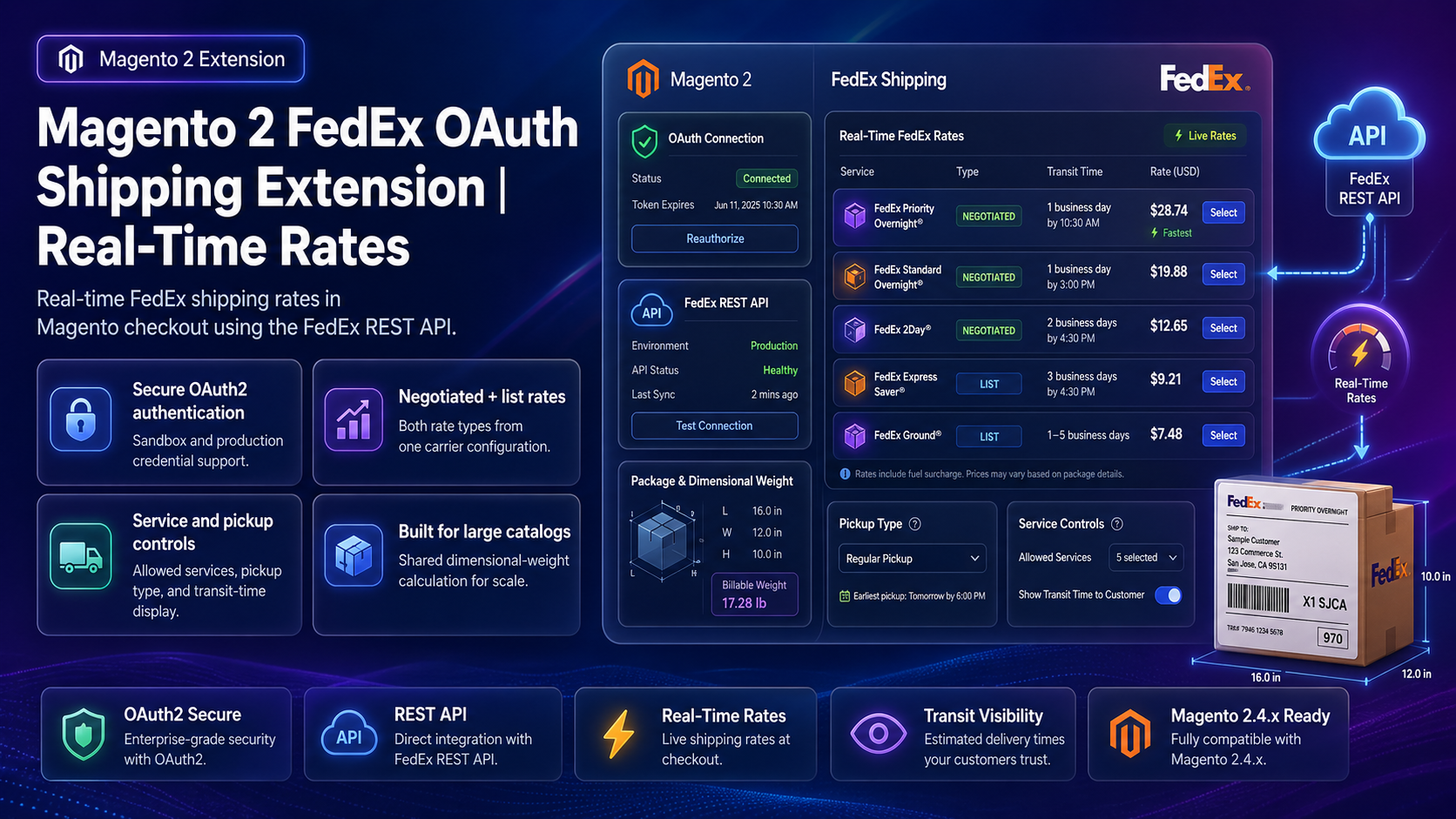
For deep configuration screenshots and edge cases, see the detailed wiki documentation. Product details and add-to-cart live on the Magento 2 FedEx OAuth REST API Shipping Extension page.
Table of Contents
Why FedEx Quotes Go Wrong
Legacy FedEx SOAP/XML integrations and guesswork table rates create margin leaks:
- List vs account confusion — shoppers see list rates while you ship on negotiated contracts
- Auth failures — older keys expire; OAuth2 is the modern FedEx REST path
- Dimension gaps — missing L×W×H inflates or zeros dimensional weight
- Too many methods — cluttered carrier lists slow checkout decisions
What This Extension Solves
The FedEx OAuth REST API Shipping Extension returns real-time FedEx rates via OAuth2 for single-origin fulfillment.
- Real-time FedEx rates in Magento cart/checkout
- OAuth2 with sandbox and production credentials
- Negotiated (ACCOUNT) and LIST rating from one configuration
- Allowed methods, pickup type, Top-N output, optional transit time
- Shared package dimensions and dim-weight modes for large catalogs
- Admin credential validation, sample-rate testing, optional debug logging
Key Features
- Built for Magento 2.4 Open Source & Adobe Commerce
- Works with Hyvä and React Checkout Pro rate collectors
- Companion Dry Ice add-on available for specialized SKUs
- Pairs with UPS / USPS REST modules
System Requirements
- Magento: 2.4.x
- PHP: 8.1–8.3
- FedEx Developer Project with REST OAuth credentials
- Towering Media Composer access
General Composer install steps for Towering Media modules: Installation guide.
Installation Overview
Step 1: Authenticate Composer
Add your Towering Media credentials to auth.json in the Magento root (same pattern as other Towering Media extensions).
Step 2: Require the package
composer require toweringmedia/module-fedex-rest-apiStep 3: Enable and upgrade
php bin/magento module:enable Toweringmedia_FedExRestApi
php bin/magento setup:upgrade
php bin/magento setup:di:compile
php bin/magento setup:static-content:deploy -f
php bin/magento cache:flush
Exact module enable name may match your package’s registration.php / module.xml—confirm in the package after install. Production stores should follow your normal deploy process.
Need help installing? Contact Towering Media or browse more modules in Magento 2 Extensions.
Configure FedEx in Admin
- Go to Delivery Methods / Towering Media FedEx REST configuration.
- Enable the method; paste Client ID, Client Secret, account number, and meter / project details as required.
- Select rating type (ACCOUNT vs LIST), pickup type, and allowed services.
- Configure dimensional weight mode and shared package defaults.
- Save Config, flush cache, then run admin Test Connection.
Credential & Rate Testing
Prove FedEx before go-live:
- Admin Test Connection succeeds
- Sample rate returns expected services for a known lane
- Checkout shows only allowed methods
- Staging order retains FedEx method and price
Troubleshooting
Empty FedEx response
- Confirm origin address and package weight exist on the quote
- Check debug log for FedEx transaction errors
- Verify production vs sandbox endpoint selection
OAuth token errors
- Regenerate client secret in FedEx Developer portal
- Confirm project APIs include Rate / Ship as licensed
- Flush Magento cache after credential changes
Frequently Asked Questions
Is Dry Ice included?
No. Dry Ice is a separate add-on/product. This guide covers the main FedEx REST rate module.
Can I limit which FedEx services appear?
Yes—use allowed methods and optional Top-N controls.
Where are deep screenshots?
On the wiki; PDP User Guide stays on wiki.
Price?
$299 on the product page.
Related Extensions & Resources
Want our Magento team to handle it?
Towering Media installs, configures, and customizes FedEx OAuth REST API Shipping for Magento 2 stores — along with API integrations, accounting and CRM sync, and carrier or fulfillment connections.
Get the Extension
Quote FedEx the modern way—OAuth REST rates, negotiated or list pricing, and admin tools to validate before launch.
Prefer screenshots and deep steps? Open the full wiki guide.