
Magento 2 AI Customer Experience Suite
See Magento 2 AI Customer Experience Suite in action
A short walkthrough of the storefront and admin, built from real screenshots.
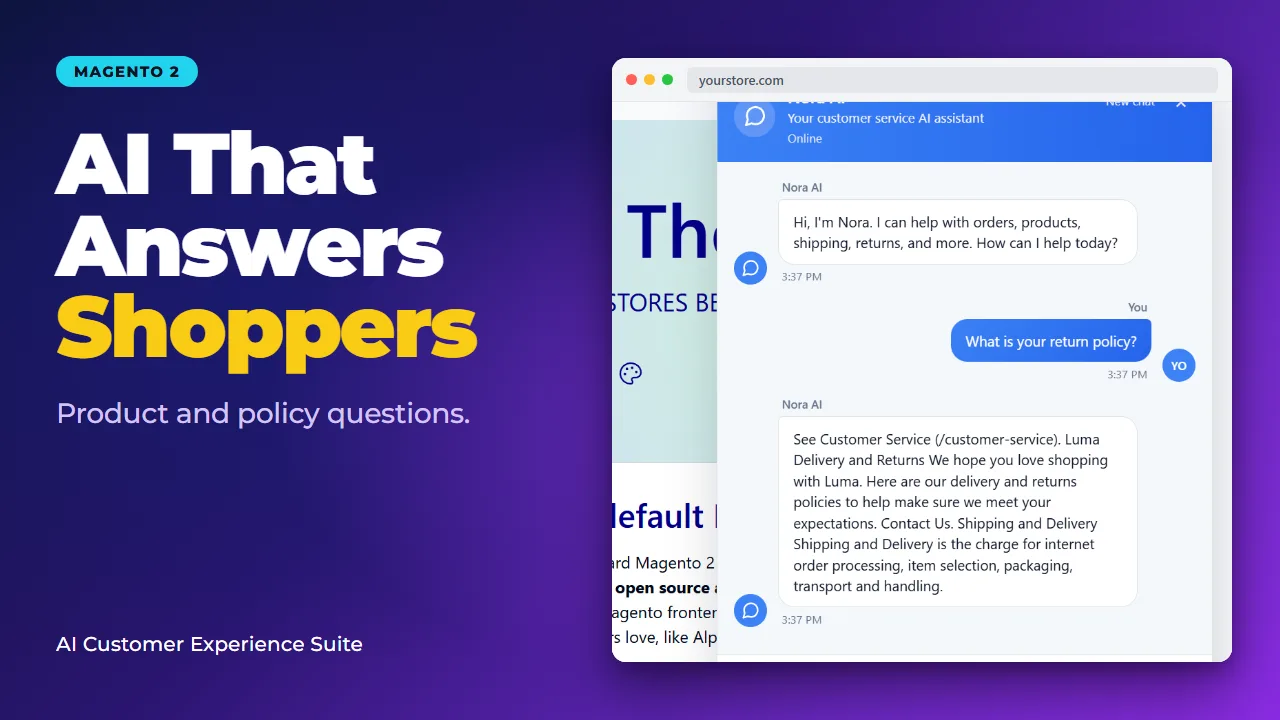
AI Core, Nora AI, and Post-Purchase Reviews together
- Three Modules AI Core + Nora + Reviews
- Storefront Help Nora answers and escalates
- Post-Purchase Reviews after delivery
- $299/month Save $298 vs $597
One subscription for the full AI customer stack
AI Core, Nora AI, and Post-Purchase Reviews ship as one auto-renewing Magento 2 subscription. Regular price is $597/month when bought separately; the suite special is $299/month (save $298).
- Includes Toweringmedia AI Core, Nora AI, and Post-Purchase Reviews
- One auto-renewing monthly subscription; cancel anytime
- Access continues through the paid month after cancel
- Shared AI providers, budgets, and safety controls via AI Core
- Storefront assistance plus delivery-aware review engagement
Built for Magento 2 customer experience
Nora answers product and policy questions on the storefront and can hand off to Live Chat. Post-Purchase Reviews sends delivery-aware experience emails, routes replies, and asks for Google reviews only after positive feedback.
- Requires Magento 2.4.6+ and PHP 8.1+
- Nora: catalog and policy answers, signed-in order help, Live Chat handoff
- Agent Hunter mobile support for on-duty agents
- Post-Purchase Reviews: reply-by-email routing and staff alerts
- Centralized AI spending and safety controls in AI Core
How It works
Magento 2 AI Customer Experience for Storefront Chat and Review Requests
Shoppers ask about products, shipping, and returns before they buy, then go quiet after delivery unless someone asks how the order went. The Magento 2 AI Customer Experience Suite covers both moments in Magento: Nora AI on the storefront, and Post-Purchase Reviews after the order is delivered or complete.
The suite is one auto-renewing subscription for three Composer packages: AI Core, Nora AI, and Post-Purchase Reviews. The published suite price is $299 per month. The same three packages are listed at $597 per month when bought separately. Cancel anytime; access continues through the month already paid. Updates are included while the license is active, and the listing includes one year of support.
AI Core stores the provider connection, encrypted API key, and spending gates once. Nora and Post-Purchase Reviews both use that connection. The subscription fee does not pay the AI provider. Usage is billed on the API key you enter.
Magento 2 AI Chatbot for Catalog and Policy Answers
Nora is a storefront chat widget for guests and signed-in shoppers. It answers from Magento catalog data, CMS and policy pages, and store information, and it can point shoppers to matching products with the name, price, and link.
Replies use AI Core when live calls are turned on. If live calls are off, the budget is exhausted, or the provider errors, Nora uses its configured fallback copy instead of inventing an answer. The welcome message should keep a clear disclosure that the shopper is talking to an assistant.
- Guests: Store, policy, and catalog answers only. No one else’s order data.
- Catalog answers: Search results can include product links drawn from the current Magento catalog.
- Your wording: Assistant name, launcher label, welcome message, and colors are set in Nora AI configuration. Leave the primary color empty to follow the storefront primary color, including Hyvä theme tokens. The widget ships its own stylesheet; there is no separate Hyvä theme package.
Order Help for Signed-in Customers
A signed-in customer can ask Nora about their own orders: status, a short summary, and tracking when Magento has it. Order questions do not transfer to a person unless the shopper asks for one.
Nora does not cancel, refund, or change an order from chat. Guests do not get order lookups, even if they know an order number. Stores that need guest order lookup or invoice download need a different workflow.
Live Chat Handoff and Agent Hunter
When a shopper asks for a person, Nora pauses that session and opens a queue in Magento admin under Customer Experience → Live Chat. A staff member claims the chat and replies in the same widget. The desktop notifier runs only while an admin page is open.
Agent Hunter is the optional phone path for agents who are away from that admin tab. An admin with permission to manage escalations generates a token, the agent opens the Agent Hunter app, turns On duty on, and claims or replies from the phone. If nobody replies before the unanswered-contact timeout, the widget asks for a name and email and Magento emails the store.
- Same conversation: The shopper stays in the storefront widget. This is not a separate chat vendor.
- Transcripts: Conversations can be filtered to bot-only, human, or escalated.
- Not a helpdesk: Nora does not open tickets in Zendesk, Gorgias, or a similar desk, and it does not add WhatsApp or Messenger.
A Knowledge Base Built from Questions Nora Cannot Answer
When Nora cannot answer, she stays in the widget, says she will ask the store, and collects a first name, email, and phone. Magento emails staff a link to review that question. An admin signs in, writes the answer, and approves it into the Knowledge Base so the next shopper can get that answer. Approving a draft can email the shopper when an address is on file.
Lead capture after a successful answer is a separate switch and is off by default. Unanswered questions do not open Live Chat unless you turn that option on. “Talk to a person” still follows the human-escalation setting.
One AI Core Setup for Providers, Budgets, and Safety
Configure the provider under Stores → Configuration → Towering Media → AI Core Settings before enabling Nora or review drafting. Chat uses an OpenAI-compatible chat-completions endpoint. The default base URL is OpenAI’s; you can point it at another compatible endpoint and model. The API key is encrypted in Magento configuration.
A fresh install does not call the provider. Dry Run defaults to Yes and Enable Live API Calls defaults to No. A live call also requires the module to be enabled, a saved API key, remaining daily budget, and no active error cooldown. The default daily call budget is 1,000 recorded calls per store per UTC day. A budget of 0 blocks calls. After an error, further calls pause for the configured cooldown (default 60 seconds).
- Validate Configuration checks the settings locally and does not make a provider request.
- Test Connection sends one short request so you can confirm the key and endpoint.
- Shared by design: Nora and Post-Purchase Reviews do not keep a second API key. AI Core is the provider layer, not a storefront assistant by itself.
Delivery-Aware Post-Purchase Review Emails
Post-Purchase Reviews waits until an order is complete, then sends on the schedule you choose: after delivery, or after a delay from complete. AI Core drafts a short check-in that can refer to the items, earlier outreach, and a repeat purchase. The customer replies to that email. The first message does not contain Great, OK, or Problem buttons.
The module, AI drafting, and inbound replies are off by default. When you enable outreach, Magento stamps a start time so older complete orders are not mailed. Cron will not backfill history while that cutoff is empty. Do not clear the cutoff on a store that already has completed orders unless you intend to email those customers.
Public Review Requests Only After a Positive Reply
Inbound mail is classified in Magento. A confident positive reply can trigger a second email that asks for a public review. You choose the destination: a Google review URL, a Facebook review URL, or another address. That ask is skipped when the customer already left a review, a recent invite is still in its cooldown, or the reply says they already reviewed. An optional thank-you without a review link can be sent when the ask is skipped.
A confident negative reply emails your staff an AI summary, the customer’s words, and the order SKUs. An optional short acknowledgement can go back to the customer. Replies that are unclear, or that fall under your confidence threshold, are saved on the customer response for staff to read. They do not receive the public review email, and they do not automatically send the staff alert.
- Patterns: Customer Responses and Reporting group complaint themes by product. A weekly digest can mail themes that clear your threshold. Alerts wait until a minimum number of check-ins exist (the default is 20).
- Unsubscribe: Each outreach can be suppressed when a customer unsubscribes.
- On-site reviews: An optional product-review XML feed exists and is off by default. This is not a Google Merchant Center certification, and the module does not submit that feed for you.
- Not in this version: Photo attachments, back-and-forth email threads, and helpdesk ticket creation.
Requirements and Limits to Plan For
- Platform: The product listing requires Magento Open Source or Adobe Commerce 2.4.6 or later, and PHP 8.1 or later. The packages declare PHP 8.1 through 8.4.
- Install: Private Composer packages from composer.toweringmedia.com:
toweringmedia/module-ai-core,toweringmedia/module-nora-ai, andtoweringmedia/module-post-purchase-reviews. Each module is enabled and configured on its own. The suite is the license, not a fourth module. - Mail and cron: Outreach uses Magento’s outbound mail. Replies need Mailgun inbound, SendGrid inbound, IMAP, or Toweringmedia SMTP with Microsoft Graph for a shared Microsoft 365 mailbox. Magento cron must be running.
- Outside the suite: React Checkout Pro, distance-delivery quoting, and a separate SMTP module are not included. Nora’s in-chat checkout path is not part of this subscription.
Setup detail for all three packages is in the AI Customer Experience Suite user guide. Standalone notes are in the Nora AI user guide and the Post-Purchase Reviews user guide.
How the Magento 2 AI Customer Experience Suite Works
1. Install AI Core, Nora AI, and Post-Purchase Reviews
Add the three packages with Composer on a staging copy first, enable Toweringmedia_AiCore, Toweringmedia_NoraAi, and Toweringmedia_PostPurchaseReviews, then run setup upgrade. Grant admin roles access to Nora conversations and escalations before go-live.
2. Connect the provider and open live calls only when you mean to
In AI Core Settings, save the base URL, model, and API key. Use Validate Configuration, then Test Connection. Leave dry-run on until staging answers look right. For production, turn Dry Run off, enable live API calls, and set a daily call budget the store can afford.
3. Enable Nora and rehearse a human handoff
Set Enable Nora to Yes for the store view. Check the welcome disclosure, guest-chat switch, and escalation timeout. On the storefront, ask a product question and a policy question, then ask to speak to a person. Claim that chat in Live Chat and confirm the reply appears in the widget. If agents will use phones, generate an Agent Hunter token and claim one test chat while On duty.
4. Turn on post-purchase outreach for new orders only
Under Post-Purchase Reviews, choose delivery-based or delay-based timing, set the staff alert inbox, and set the public review destination and URL. Enable AI drafting and inbound replies for the feedback mailbox, confirm outbound mail is authenticated, and confirm cron. Place a test order that completes after the cutoff and follow it in Invitations and Customer Responses. The first email should be a check-in. The public review email should appear only after a positive reply.
Key Features
Shared AI infrastructure, storefront assistance, and post-purchase review engagement in one suite.
- AI Core foundation Shared AI providers, budgets, and safety controls for the suite.
- Nora storefront chat Answers product and policy questions on the Magento storefront.
- Signed-in order help Nora can help signed-in customers with order-related requests.
- Live Chat handoff Transfer conversations to live support when AI is not enough.
- Agent Hunter Mobile support for agents to claim and reply while on duty.
- Delivery-aware emails Post-Purchase Reviews sends experience check-ins after handoff.
- Reply-by-email routing Customer replies are routed for review asks or staff alerts.
- Google review asks Public review requests after positive customer feedback.
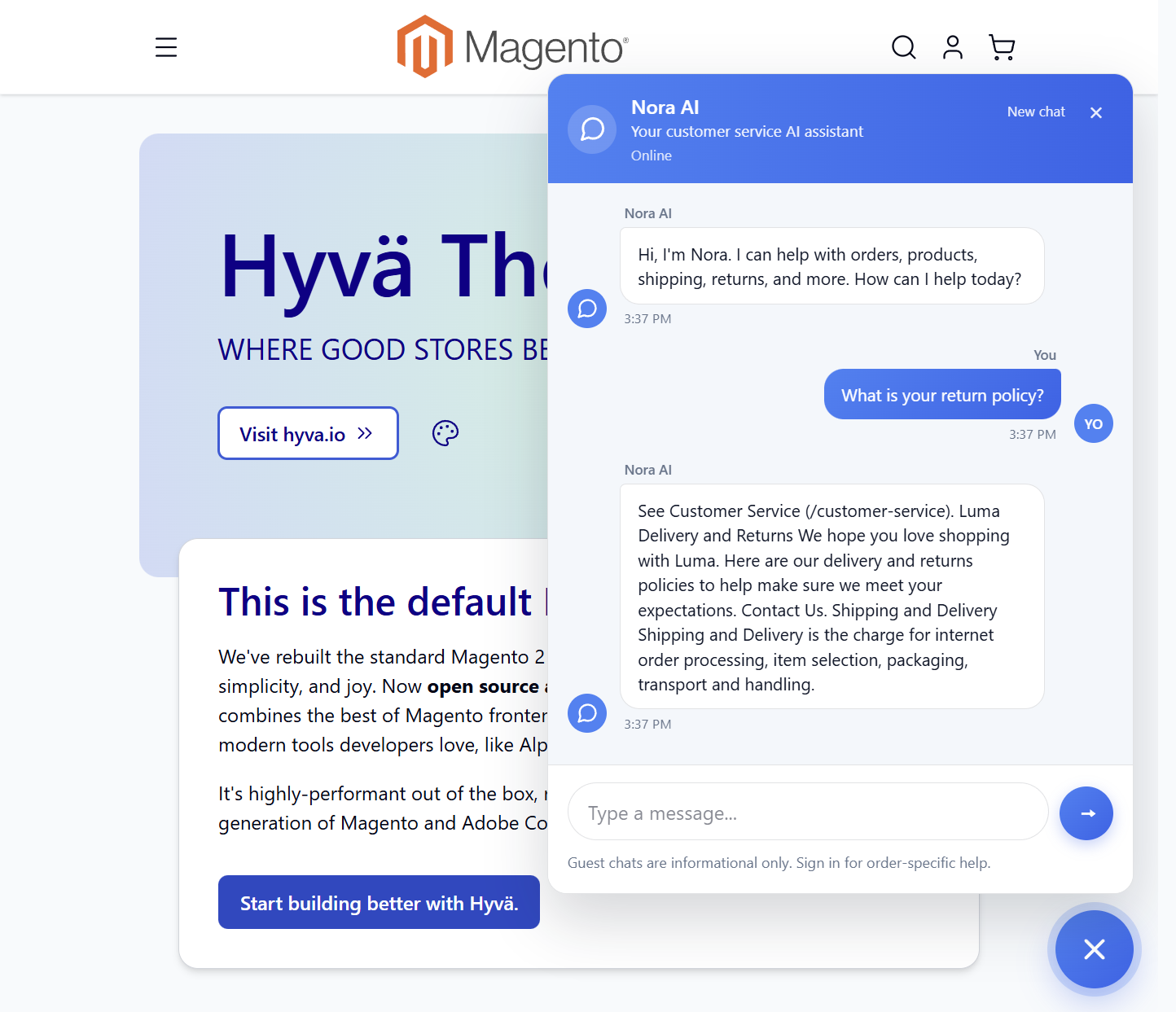
Storefront help that stays inside Magento
Nora appears as a storefront chat widget for product and policy questions, with Live Chat handoff when a person is needed. AI Core supplies the shared providers and budgets; Post-Purchase Reviews handles the after-delivery experience.
- AI Core configures providers and spending controls once
- Nora assists guests and signed-in shoppers on the storefront
- Post-Purchase Reviews automates delivery-aware follow-ups
Demo
Docs & Support
📘 Documentation
Get started with the Magento 2 AI Customer Experience Suite user guide— AI Core setup, Nora AI storefront assistance, Post-Purchase Reviews, budgets, and safety controls.
- AI Core configuration and AI provider setup
- Nora AI storefront assistant configuration
- Post-Purchase Reviews configuration
- AI budgets and safety controls
- Customer assistance and Live Chat handoff
- Post-purchase review and email workflows
💬 Support
Need help with the Magento 2 AI Customer Experience Suite? Contact Toweringmedia for assistance with installation, configuration, AI features, and troubleshooting.
- Help with installation and configuration
- Assistance with AI Core setup
- Guidance on Nora AI configuration
- Help with Post-Purchase Reviews setup
- AI provider, budget, and safety configuration guidance
- Magento 2.4.6+ and PHP 8.1+ compatibility guidance
Reviews
Frequently Asked Questions
What does the Magento 2 AI Customer Experience Suite include?
One monthly subscription covers three Composer packages: AI Core, Nora AI, and Post-Purchase Reviews. AI Core holds the shared provider settings and call budget. Nora is the storefront assistant and live-chat handoff. Post-Purchase Reviews sends the after-delivery check-in and routes replies. You install and configure each package. The suite is the license, not an extra module.
Who should buy this instead of a chatbot and a review plugin separately?
Stores that want Magento-native answers before the sale and a private check-in before any public review ask. Nora reads the catalog and CMS at question time, and staff reply in Magento admin or Agent Hunter. Post-Purchase Reviews writes the merchant’s own email and withholds the public review link until a reply is confidently positive. It is a poor fit if you need guest order lookup, invoice download, WhatsApp, or a ticket desk inside the chat.
Can Nora answer product and policy questions?
Yes. Guests and signed-in shoppers can ask about products, store policies, and contact details. Catalog answers can include product names, prices, and links from Magento. Nora uses the AI provider only after you turn live calls on. Otherwise it falls back to the copy you configured.
Can customers check an order in the chat?
Signed-in customers can ask about their own orders, including status, a summary, and tracking when Magento has a tracking number. Guests do not get order lookups. Nora does not cancel, refund, or change the order from the chat. Those requests need a person.
What happens when a shopper wants a person?
If human escalation is enabled, Nora queues the chat and pauses the assistant for that session. Staff claim it in Customer Experience → Live Chat and reply in the same widget. The admin notifier only runs while a Magento admin page is open. Agent Hunter is the optional on-duty phone app for the same queue. If nobody replies before the timeout, the widget asks for a name and email and Magento emails the store.
Does the $299 monthly price include AI provider charges?
No. The subscription covers the extensions, updates while the license is active, and the listed support term. You supply an API key under AI Core. The provider bills that account for live chat-completions traffic. Dry Run defaults to Yes and live calls default to No, so a new install does not send paid requests until you opt in. A daily call budget and an error cooldown limit how many calls proceed.
When does the suite ask for a Google review?
Not in the first email. The first message is a short experience check-in with no rating buttons. After the customer replies, a confident positive classification can send a separate email to the review URL you configured: Google, Facebook, or another address. The ask is skipped if they already reviewed, a cooldown is active, or they say they already reviewed. Negative replies alert staff instead. Unclear replies are stored for staff and do not get the public link.
What email setup does reply-by-email need?
Outbound mail goes through Magento, so the store needs working mail and authenticated sending (SPF and DKIM) for the From address. Inbound replies need one of: Mailgun inbound routes, SendGrid inbound parse, an IMAP mailbox, or Toweringmedia SMTP with Microsoft Graph for a shared Microsoft 365 mailbox. Magento cron has to run for scheduling, reply processing, and the weekly pattern digest. Microsoft 365 basic IMAP passwords are not a reliable option; use Graph for those mailboxes.
Will enabling Post-Purchase Reviews email old orders?
Not by default. Enabling outreach stamps a cutoff at the current time, and cron creates no invitations from the order scan while that cutoff is empty. Only orders that complete on or after the cutoff are eligible. Clearing the cutoff on a live store with order history can mail those older customers.
Which Magento and PHP versions are required?
The product listing requires Magento Open Source or Adobe Commerce 2.4.6 or later and PHP 8.1 or later. Package constraints allow PHP 8.1 through 8.4. Test the Nora launcher on your theme, including Hyvä: the widget uses its own stylesheet and can inherit the theme primary color. It is not a separate Hyvä compatibility package.
Technical Specifications
- Magento Version: Magento 2.4.6+
- PHP Version: PHP 8.1+
- SKU: tm-ai-cx-suite
- Edition: Community
- License Model: One auto-renewing monthly subscription covering all three Composer packages
- Subscription: $299/month, regular $597/month when purchased separately
- Included Modules: AI Core, Nora AI, and Post-Purchase Reviews
- AI Core: Shared AI providers, budgets, safety gates, and AI infrastructure
- Nora AI: Storefront chat, product and policy answers, signed-in order help, Live Chat handoff, and Agent Hunter mobile support
- Post-Purchase Reviews: Delivery-aware experience emails, reply-by-email routing, Google review requests, and staff alerts
- AI Dependency: Nora AI and Post-Purchase Reviews require AI Core
- Composer Package: toweringmedia/module-ai-core
- Composer Package: toweringmedia/module-nora-ai
- Composer Package: toweringmedia/module-post-purchase-reviews
- Composer Repository: composer.toweringmedia.com
- Installation: Private Composer packages
- AI Provider Management: Shared provider configuration through AI Core
- AI Budget Controls: Centralized AI usage and budget controls
- Safety Controls: Shared AI safety gates and controls
- Customer Assistance: AI-powered storefront assistance and signed-in order support
- Post-Purchase Engagement: Automated delivery-aware review outreach and Google review requests
Compatible with your Magento 2 store
Built for Magento 2.4.6+ with PHP 8.1+. The suite is one auto-renewing monthly subscription that covers AI Core, Nora AI, and Post-Purchase Reviews.
-
 Magento 2.4.6+
Open Source & Adobe Commerce
Magento 2.4.6+
Open Source & Adobe Commerce
 Hyvä compatibleBuilt for modern storefronts
 Updates & supportKeep your store running smoothly