
Toweringmedia Shop By Brand
Dedicated brand pages and discovery for Magento 2
- Brand Pages Custom URLs and logos
- Brand Listing Logo-based browse page
- Manual Assign Control product order
- SEO Ready Metadata per brand
Help shoppers find products by brand
Create dedicated brand pages, assign products manually, showcase brand logos, and help customers discover more products from their favorite brands with flexible storefront and SEO settings.
- Dedicated brand pages with custom URLs, logos, descriptions, and SEO metadata
- Use any Magento product attribute as the brand source
- Assign products manually and control display order
- Logo-based brand listing page for browsing
- Brand logos and descriptions on product detail pages
Built for Magento 2.4.x
Compatible with Magento 2.4.x — Open Source and Adobe Commerce. Configure brand page layout, product limits, sorting, filters, pagination, and Add to Cart options from Magento settings.
- Configurable More from this Brand product block
- Control brand visibility and storefront placement
- Configurable URL routes and pagination SEO settings
- PHP 8.1, 8.2, 8.3, and 8.4 compatible
- Requires Toweringmedia Base
How It works
See It In Action
Build a powerful brand shopping experience with the Toweringmedia Shop by Brand Extension for Magento 2. Create dedicated brand pages, assign products manually, showcase brand logos, and help customers discover more products from their favorite brands with flexible storefront and SEO settings.
- Create dedicated brand pages with custom URLs, logos, descriptions, and SEO metadata
- Use any Magento product attribute as the source for your brands
- Assign products manually and control their display order with custom positions
- Display brands on a dedicated logo-based brand listing page
- Show brand logos and descriptions directly on product detail pages
- Add a configurable “More from this Brand” product block to increase product discovery
- Configure brand page layout, product limits, sorting, filters, pagination, and Add to Cart options
- Control brand visibility, storefront placement, URL routes, and pagination SEO settings
Key Features
Brand pages, logo listing, product assignment, and on-page brand discovery for Magento 2.
- Brand pages Custom URLs, logos, descriptions, and SEO metadata per brand.
- Attribute source Use any Magento product attribute for brands.
- Manual assignment Assign products and set individual positions.
- Brand listing Dedicated logo-based listing page for all brands.
- Product page brand Show logos and descriptions on product detail pages.
- More from this Brand Configurable related-brand product block.
- Page controls Layout, limits, sorting, filters, pagination, Add to Cart.
- SEO and routes Visibility, URL routes, and pagination SEO settings.
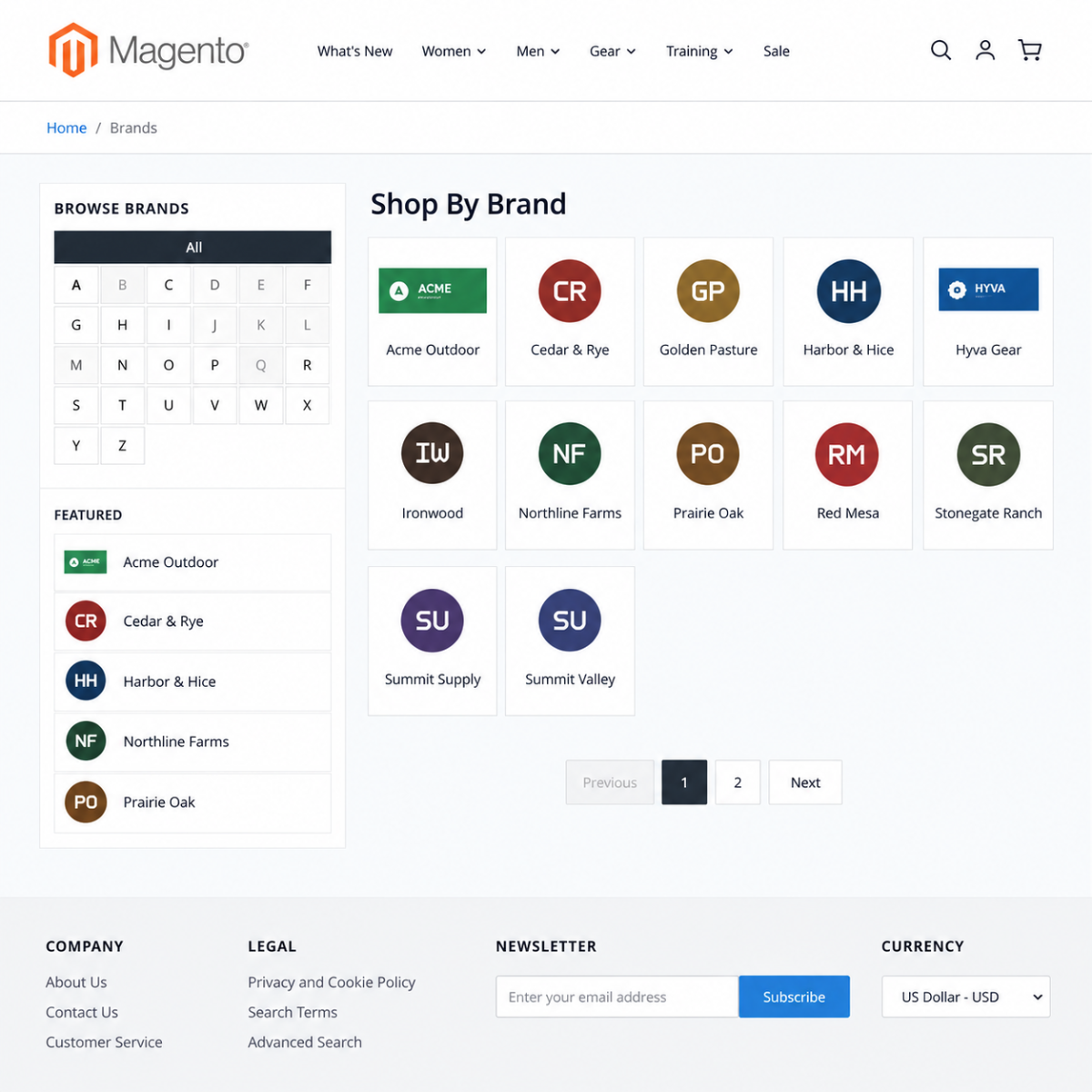
A brand shopping experience shoppers can browse
Customers browse brands from a logo listing page, open dedicated brand pages, and discover more products from the same brand on product detail pages.
- Logo-based brand listing
- Dedicated brand detail pages
- More from this Brand on the product page
Demo
Docs & Support
📘 Documentation
Our comprehensive documentation helps you quickly install, configure, and manage brand pages for your Magento 2 store, including brand creation, product assignment, storefront configuration, SEO settings, and product page integration.
- Step-by-step installation and configuration guide
- Create and manage brands using Magento product attributes
- Configure brand logos, descriptions, URL keys, and SEO metadata
- Assign products manually and control their display order
- Configure brand listing pages, product page information, and More from this Brand
- Best practices, troubleshooting, and extension configuration
💬 Support
Need assistance? Our Magento experts are ready to help with installation, configuration, brand management, product assignment, storefront display, SEO settings, and troubleshooting.
- Fast and reliable technical support
- Help configuring brands and product attributes
- Assistance with product assignment and display ordering
- Guidance for brand pages, product page integration, and storefront settings
- Help with SEO configuration and pagination settings
- Regular updates and ongoing compatibility support
Frequently Asked Questions
The Toweringmedia Shop by Brand Extension allows Magento 2 merchants to create dedicated brand pages, showcase brand logos and descriptions, assign products, and provide customers with an easy way to browse products by brand.
Yes. The extension allows you to configure which Magento product attribute should be used as the brand attribute. The default attribute is manufacturer, but you can select another suitable product attribute from the configuration.
Yes. Products can be selected manually from the Magento Admin product grid. You can assign products to a brand and set an individual position for each product to control the order in which they appear on the brand page.
Customers can browse all brands from the dedicated brand listing page and visit individual brand pages. Brand information can also be displayed on product detail pages, where the brand logo links directly to the corresponding brand page.
Yes. The configurable More from this Brand block displays additional products assigned to the same brand. You can configure its heading, position, layout, product limit, sorting method, and Add to Cart button visibility.
Yes. Each brand can have its own URL key, while the brand route prefix can also be configured from Magento settings. By default, brand pages use the brands route, such as /brands/example-brand.
Yes. You can configure a custom meta title, meta description, URL key, and brand description. The extension also provides an option to add NOINDEX,FOLLOW to paginated brand pages.
If a brand does not have a logo configured, the brand name is displayed instead. This ensures customers can still identify and access the brand without requiring a logo image.
Do you offer support?
Yes. Email support@toweringmedia.com or call (773) 466-2454. Updates and support continue while your subscription is active.
Can I try a demo?
Yes. Use the View Demo button on this page. For a guided walkthrough, email support@toweringmedia.com.
What happens when I don’t renew?
Uncheck auto-renew at purchase, or cancel later. You keep access until the end of the paid period. After that, updates and support stop.
Technical Specifications
- Magento Version: Compatible with Magento 2.4.x (Open Source & Adobe Commerce)
- PHP Version: PHP 8.1, 8.2, 8.3 & 8.4 compatible
- Framework: Built using Magento 2 native architecture
- Installation Type: Composer installation supported
- Module Dependency: Toweringmedia Base Module
- Brand Attribute: Configurable Magento product attribute, with manufacturer as the default
- Brand Management: Create, edit, and delete dedicated brand pages from Magento Admin
- Product Assignment: Manual product selection with custom product positions
- Brand Logo: PNG, GIF, JPG & JPEG formats up to 4 MB
- Brand Status: Supports enabled and disabled brand pages
- Brand Listing: Dedicated storefront brand listing with responsive logo grid
- Brand Pages: Custom URL keys with configurable route prefix
- Product Grid: Magento catalog toolbar, sorting, pagination, filtering, Compare Products & Wishlist
- Product Page: Clickable brand logo with configurable display placement
- Brand Description: Optional description display on product pages
- More from This Brand: Configurable related product block for products assigned to the same brand
- Block Layout: Grid or single-row layout with configurable content position
- Product Limit: Configurable maximum number of products to display
- Product Sorting: Bestsellers, Name, Price or Position
- Add to Cart: Configurable Add to Cart button on brand pages and More from this Brand
- SEO: Custom URL keys, meta titles, meta descriptions and brand descriptions
- Pagination SEO: Optional NOINDEX,FOLLOW for paginated brand pages
- Storefront Route: Configurable route prefix, with brands as the default
- Cache: Magento cache and Full Page Cache compatible
- Updates: Regular compatibility updates and ongoing technical support
Compatible with your Magento 2 store
Compatible with Magento 2.4.x — Open Source and Adobe Commerce. PHP 8.1–8.4. Requires Toweringmedia Base.
-
 Magento 2.4.x
Open Source & Adobe Commerce
Magento 2.4.x
Open Source & Adobe Commerce
 Updates & supportKeep your store running smoothly