
Toweringmedia Custom Form Extension
See Toweringmedia Custom Form Extension in action
A short walkthrough of the storefront and admin, built from real screenshots.
Build Magento forms without code
- Visual Builder Drag-and-drop fields
- 16 Field Types File, map, rating, more
- Inline or Popup CMS, widget, or XML
- Submission Hub Reply, export, analytics
Build Magento forms without code
Custom storefront forms usually need developer work. Custom Forms gives a drag-and-drop builder with sixteen field types, conditional logic, and a submission hub for replies, exports, and analytics.
- Drag-and-drop builder under Content → Custom Form
- Sixteen field types including file, map, and rating
- Conditional fields with server-side validation
- Multi-page forms with previous/next navigation
- Embed via CMS shortcode, widget, or layout XML
Built for your store
Compatible with Magento 2.4.x. Luma templates ship in the base package; Hyvä templates are an optional add-on.
- Works with Magento 2.4.x and PHP 8.1–8.3
- Requires Toweringmedia Base
- Admin alerts, replies, and customer autoresponses
- Privacy messaging and reCAPTCHA options
- Optional Hyvä templates as a separate add-on
How It works
See It In Action
Magento 2 Custom Forms Extension
Build Powerful Custom Forms Directly in Magento 2
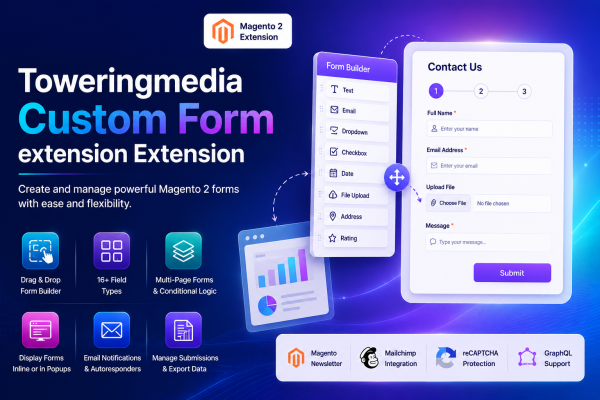
Toweringmedia Custom Forms Extension for Magento 2 provides a flexible visual form builder for creating contact forms, surveys, registration forms, application forms, feedback forms, and other customer data collection workflows.
Create responsive single-page or multi-page forms, display them inline or in popups, collect secure submissions, automate email notifications, accept file uploads, and manage submitted data directly from Magento Admin.
Visual Form Builder
Create Custom Forms Without Editing Templates
Build forms from Magento Admin using a visual field palette and canvas. Add fields by clicking or dragging them into the form, configure their properties, and arrange them in the required order.
- ✓ Add fields by clicking or dragging them onto the form canvas
- ✓ Edit, duplicate, delete, and reorder form fields
- ✓ Create multiple pages for guided form workflows
- ✓ Configure unique field codes for validation, storage, and email variables
Flexible Field Types
Collect the Information Your Business Needs
Choose from 16 field types for collecting customer details, selections, dates, documents, addresses, ratings, and other structured information.
Field Configuration
Control Validation, Layout, and Field Behavior
Configure each field according to your data collection requirements. Add validation rules, tooltips, default values, layout settings, and conditional display rules without changing the module code.
- ✓ Required fields, placeholders, tooltips, and default values
- ✓ Email, number, maximum-length, and regular-expression validation
- ✓ Read-only fields, custom CSS classes, inline styles, and column layouts
- ✓ Configurable options for dropdown, list box, checkbox, and radio fields
- ✓ Global and per-field file extension restrictions
Guided Form Workflows
Build Multi-Page and Conditional Forms
Divide longer forms into manageable pages and display fields according to earlier customer responses. This helps create cleaner forms and more relevant customer journeys.
- ✓ Add, rename, arrange, and delete form pages
- ✓ Previous and Next navigation for multi-page forms
- ✓ Show or hide fields based on another field’s value
- ✓ Apply dependency rules during both storefront display and server-side validation
Flexible Storefront Placement
Display Forms Wherever Customers Need Them
Add forms to CMS pages, CMS blocks, product pages, category pages, and other storefront locations using Magento-friendly embedding methods.
- ✓ Embed forms through CMS directives using a form code or form ID
- ✓ Place forms with the Magento Custom Form widget
- ✓ Add forms through Magento layout XML
- ✓ Display forms inline or inside a popup modal
- ✓ Choose Default, Linear, or Circle form designs
Customer Submission Experience
Provide a Responsive and Secure Form Experience
Customers can complete responsive forms with clear labels, validation messages, tooltips, secure file handling, and configurable post-submission behavior.
- ✓ Submit forms through AJAX without reloading the page
- ✓ Display a configurable success message after submission
- ✓ Redirect customers to a configured success URL
- ✓ Restrict forms by store view, customer group, and scheduled availability
- ✓ Prevent repeat submissions when a form is configured as a survey
Secure File Handling
Accept and Manage Customer Attachments
Add file upload fields to application forms, support requests, document requests, and other workflows that require customer attachments.
- ✓ AJAX file upload before the main form submission
- ✓ Global and field-specific allowed file extensions
- ✓ Secure download authorization for stored attachments
- ✓ Configurable file-link expiration period
- ✓ Customer ownership checks for account-based file downloads
Email Automation
Notify Administrators and Respond to Customers
Automate communication after a form is submitted. Use global notification settings or configure individual forms with their own recipients, templates, and autoresponder behavior.
- ✓ Send new-submission notifications to administrators
- ✓ Configure recipients, sender identities, and email templates
- ✓ Send automatic confirmation emails to customers
- ✓ Use submitted field values as dynamic email variables
- ✓ Reply to a customer directly from the submission detail page
Submission Management
Review, Filter, Reply to, and Export Submitted Data
Manage form responses from a centralized Magento Admin grid. Review submitted values and metadata, download attachments, contact submitters, and export data for reporting or offline processing.
- ✓ Filter submissions by form, customer email, and status
- ✓ View submitted values, metadata, and uploaded files
- ✓ Reply to customers from Magento Admin
- ✓ Export individual or selected submissions as CSV
- ✓ Export individual or selected submissions as PDF when Dompdf is installed
Customer Account Management
Let Customers Manage Their Own Submissions
Add a My Submitted Forms section to customer accounts so logged-in customers can review their previous submissions and, when permitted, update or remove their information.
- ✓ List and view the customer’s own submitted forms
- ✓ Allow customers to edit submitted data
- ✓ Allow customers to delete submitted data
- ✓ Notify administrators when customers edit or remove information
- ✓ Protect submission access with customer ownership validation
Integrations
Connect Forms with Magento and External Services
Extend form workflows with newsletter subscriptions, Mailchimp synchronization, Google Maps fields, GraphQL support, privacy consent, and Magento reCAPTCHA.
- ✓ Magento Newsletter subscription checkbox
- ✓ Mailchimp audience synchronization with optional double opt-in
- ✓ Google Map and address fields with geocoding support
- ✓ Privacy consent checkbox with configurable text
- ✓ Magento reCAPTCHA integration and server-side validation
- ✓ GraphQL form loading and submission for headless storefronts
Form Analytics
Monitor Form Activity from Magento Admin
Review submission activity for each form and identify changes in customer engagement over the configured reporting period.
- ✓ View submission totals by form
- ✓ Review the latest submission date
- ✓ Compare submission trends as a percentage
- ✓ Configure the analytics trend period
Compatibility & Technical Specifications
Platform
Magento 2.4.x
PHP
PHP 8.1, 8.2, and 8.3
Base Dependency
Toweringmedia Base Module
Storefront Display
Inline and Popup Forms
Embedding
CMS Directive, Widget, and Layout XML
API
Magento GraphQL
Submission Export
CSV and Optional PDF
Spam Protection
Magento reCAPTCHA Integration
Optional Integrations
Mailchimp, Google Maps, Hyvä, and GA4
PDF export requires the optional Dompdf package. Google Map fields require a valid Google Maps API key. Dedicated Hyvä storefront support and GA4/GTM tracking are available through separate add-on packages.
Key Features
Admin form builder with multi-page and conditional fields, storefront embedding, submissions, notifications, and optional integrations.
- Drag-and-drop builder Create forms under Content → Towering Media Custom Form → Forms.
- Sixteen field types Text through file upload, map, address, rating, heading, and HTML.
- Conditional fields Dependency rules with server-side validation on submit.
- Multi-page forms Previous/Next navigation and progress across form pages.
- Flexible embedding CMS shortcode, Magento widget, or layout XML; inline or popup.
- Notifications & autoresponder Admin alerts, replies, and customer auto-responses from config.
- Privacy and reCAPTCHA Consent messaging and advanced options for maps and captcha.
- Analytics and exports Submission grids, form analytics, and CSV or PDF export options.
Demo
Docs & Support
📘 Documentation
Get started quickly with our Custom Forms user guide—form builder, field configuration, storefront embedding, submissions, notifications, and integrations.
- Visual form builder and field configuration
- Multi-page forms and conditional fields
- CMS, widget, and layout XML embedding
- Submission management and email notifications
- File uploads, customer submissions, and exports
- GraphQL, Mailchimp, reCAPTCHA, and Google Maps integration
💬 Support
Need help? Our Magento experts can assist with installation, configuration, form setup, integrations, and troubleshooting.
- Help with installation and configuration
- Assistance with form builder and field setup
- Guidance on submissions, notifications, and integrations
- Troubleshooting and compatibility guidance
- Magento 2.4.x support
Frequently Asked Questions
Where do I build forms and review submissions?
Open Content → Towering Media Custom Form → Forms for the builder, Submitted Data for responses, and Form Analytics for activity. Global email and integration defaults are under Stores → Configuration → Towering Media → Custom Forms.
How do I place a form on the storefront?
Use the CMS directive {{customform code="your-code"}}, add a Toweringmedia Custom Form widget with Form ID and display mode, or include the form via layout XML. Forms can render inline or as a popup.
Is Hyvä included in the base package?
The base module includes Luma/default storefront templates. Hyvä Theme templates ship separately as toweringmedia/module-custom-forms-hyva. GA4/GTM form events are likewise optional via module-custom-forms-ga4.
Do you offer support?
Yes. Email support@toweringmedia.com or call (773) 466-2454. Updates and support continue while your subscription is active.
Can I try a demo?
Yes. Use the View Demo button on this page. For a guided walkthrough, email support@toweringmedia.com.
What happens when I don’t renew?
Uncheck auto-renew at purchase, or cancel later. You keep access until the end of the paid period. After that, updates and support stop.
Technical Specifications
- Magento Version: Magento 2.4.x
- PHP Version: PHP 8.1, 8.2, and 8.3
- Package: toweringmedia/module-custom-forms
- Module: Toweringmedia_CustomForms
- Module Version: 0.1.2
- Dependency: toweringmedia/module-base
- Form Builder: Visual drag-and-drop form builder
- Field Types: 16 field types including Text, Email, Number, Date, Dropdown, Checkbox, File Upload, Google Map, Address, Star Rating, Heading, and HTML
- Conditional Fields: Dependency-based field display and server-side validation
- Multi-Page Forms: Supported with Previous/Next navigation and progress presentation
- Form Display: Inline and popup storefront display
- Embedding Methods: CMS directives, Magento widgets, and Layout XML
- Submission: AJAX submission with validation and configurable success handling
- File Uploads: Validated uploads with secure downloads and expiring download links
- Email Notifications: Admin notifications, customer autoresponders, and admin replies
- Export: CSV and optional PDF export
- Customer Account: My Submitted Forms with configurable view, edit, and delete permissions
- Integrations: Magento Newsletter, Mailchimp, Google Maps, reCAPTCHA, and GraphQL
- Analytics: Per-form submission statistics and configurable trend analysis
- Security: CSRF/form-key validation, reCAPTCHA validation, access checks, and escaped output
- Extension Points: Magento service contracts, events, dependency injection, plugins, and observers
Compatible with your Magento 2 store
Compatible with Magento 2.4.x and PHP 8.1, 8.2, and 8.3. Requires toweringmedia/module-base. Luma storefront rendering ships in the base package; Hyvä templates are an optional toweringmedia/module-custom-forms-hyva add-on. Configure under Stores → Configuration → Towering Media → Custom Forms.
-
 Magento 2.4.x
Open Source & Adobe Commerce
Magento 2.4.x
Open Source & Adobe Commerce
 Updates & supportKeep your store running smoothly