
Magento 2 PayPal Express (Orders v2) User Guide
Legacy PayPal integrations are being retired. This guide shows how PayPal Express for Magento 2 REST API using Orders v2 ($199) replaces discontinued flows with PayPal’s current Orders v2 + JS SDK path—install overview, credentials, capture/authorize, webhooks, troubleshooting, and FAQ.
There is no separate wiki page for this module yet—this CMS guide is the primary how-to. Product details and add-to-cart live on the PayPal Express for Magento 2 REST API using Orders v2 page. Browse more modules in Magento 2 Extensions.
Table of Contents
Why Legacy PayPal Breaks Modern Magento
Older Magento PayPal modules still depend on deprecated Classic / NVP-style APIs:
- API sunsets — discontinued endpoints stop approving or capturing payments
- Weak Express UX — cart/minicart buttons feel bolted on instead of SDK-native
- Shipping friction — address changes inside PayPal do not update Magento quotes cleanly
- Reconciliation gaps — payment status drifts without webhook handling
What This Extension Solves
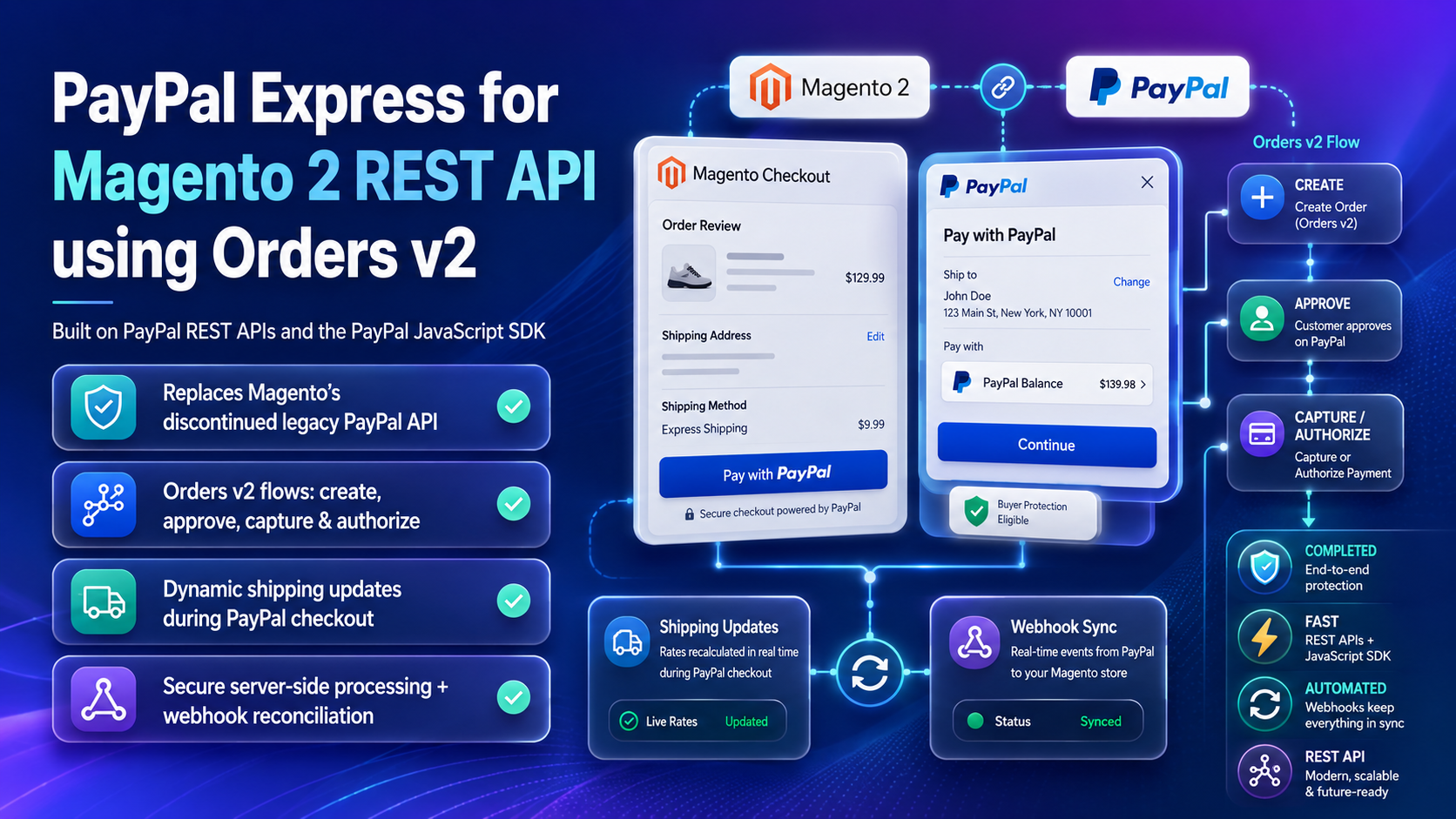
PayPal Express for Magento 2 REST API using Orders v2 implements Express checkout on PayPal’s supported REST Orders v2 platform with the JavaScript SDK.
- Replaces discontinued legacy PayPal API integrations
- Uses PayPal REST APIs and the PayPal JavaScript SDK
- Orders v2 create, approve, capture, and authorize flows
- Dynamic shipping updates during PayPal checkout
- Server-side Magento order placement after payment approval
- Webhook-based payment status reconciliation
- Designed for modern Magento checkout experiences (including React Checkout Pro environments)
Key Features
- Express buttons for supported Magento checkout placements
- Sandbox and live credential modes
- Capture or authorize payment intent (per PayPal account capability)
- Shipping callback support during the PayPal sheet
- Webhook endpoints for payment status updates
- Open Source & Adobe Commerce Magento 2.4.x
System Requirements
- Magento: 2.4.4 – 2.4.7+ (Open Source & Adobe Commerce)
- PHP: 8.1, 8.2, or 8.3
- Towering Media Composer repository credentials
- A PayPal Business account with REST API credentials (Client ID / Secret)
General Composer install steps: Installation guide.
Installation Overview
Step 1: Authenticate Composer
Add your Towering Media credentials to auth.json in the Magento root (same pattern as other Towering Media extensions).
Step 2: Require the package
composer require toweringmedia/module-paypal-expressStep 3: Enable and upgrade
php bin/magento module:enable Toweringmedia_PaypalExpress
php bin/magento setup:upgrade
php bin/magento setup:di:compile
php bin/magento setup:static-content:deploy -f
php bin/magento cache:flush
Exact module enable name may match your package’s registration.php/module.xml—confirm in the package after install. Production stores should follow your normal deploy process.
Configure PayPal Credentials
Connect your PayPal REST app and choose Express behavior:
- Log in to Magento Admin.
- Open Stores → Configuration → Sales → Payment Methods (or Toweringmedia → PayPal Express, depending on version).
- Enable PayPal Express / Orders v2.
- Enter Sandbox or Live Client ID and Secret from the PayPal Developer dashboard.
- Choose payment intent (capture vs authorize) and button placements you need.
- Configure webhook URL in PayPal to match the module’s documented endpoint, Save Config, flush cache.
Express Checkout Flow
Shoppers click PayPal Express, approve payment in the PayPal sheet (optionally updating shipping), then Magento finalizes the quote into an order using server-side capture/authorize.
- Test guest and logged-in carts
- Confirm tax/shipping totals match Magento after address changes
- Works alongside React Checkout Pro when that suite is installed
Troubleshooting
Buttons do not render
- Confirm Enable = Yes and Client ID is for the correct mode (Sandbox vs Live)
- Check browser console for PayPal SDK load errors
- Flush Magento and Full Page Cache after config changes
Payment approved but Magento order missing
- Inspect Magento payment logs for capture/authorize errors
- Confirm webhook delivery in the PayPal dashboard
- Verify cron / queue if async finalize is enabled
Shipping totals wrong inside PayPal
- Confirm shipping callback is enabled and methods are available for the address
- Test with a simple flat-rate method first
Still stuck? Contact support with the exact admin error text or log snippet (never paste API secrets or private keys in plain email).
Frequently Asked Questions
Is this the legacy Magento PayPal Express?
No. It targets PayPal REST Orders v2 + JS SDK—the supported modern path.
Does it work with Hyvä / React Checkout?
It is designed for modern Magento checkouts; React Checkout Pro environments are a common pairing.
How much does it cost?
$199 — see the product page for current pricing.
Can Towering Media help migrate off legacy PayPal?
Yes. Contact us with your current PayPal module and Magento version.
Related Extensions & Resources
Want our Magento team to handle it?
Towering Media installs, configures, and customizes PayPal Express (Orders v2) for Magento 2 stores — along with payment gateway setup, checkout customization, and React or one-page checkout builds.
Get the Extension
Move Magento to PayPal Orders v2. Replace discontinued legacy PayPal APIs with Express checkout built on REST, the JS SDK, shipping callbacks, and webhooks.