
Nora AI for Magento 2
AI storefront help that escalates
 Includes Core AI, the shared AI foundation, at no extra cost.
- Instant Answers Products, policies, store info
- Order Aware Signed-in status and tracking
- Live Handoff Agents claim and reply
- Agent Hunter Mobile PWA on duty
AI storefront help that escalates
Shoppers need product and policy answers without waiting on email, and a human when AI is not enough. Nora is a floating Magento chat widget that answers from catalog and CMS, gives signed-in order help, and hands off to live agents.
- Branded floating chat widget per store view
- Answers from live Magento catalog, CMS, and config
- Signed-in read-only order status and tracking
- Live Chat escalation for agents to claim and reply
- Optional voice mode with mic and spoken replies
Built for your store
Works on Magento 2.4.x. Includes Agent Hunter PWA for on-duty agents. Core AI is included at no extra cost.
- Works with Magento 2.4.x and PHP 8.1–8.4
- Core AI included
- Guests and signed-in shoppers both supported
- Widget colors, launcher style, and unread badge
- Knowledge Base drafts from unresolved gaps
How It works
Nora AI for Magento 2
A floating storefront AI assistant that answers product and policy questions instantly, gives signed-in customers live order help, and routes to a human agent when needed — all inside a customizable chat widget on your store.
Always-On Storefront Assistant
Instant Answers, Any Page, Any Shopper
Nora appears as a branded floating chat widget on your storefront. Guests get instant answers about products, policies, shipping, and store contact info. Signed-in customers also get read-only help with their own orders — status, tracking, summaries — without leaving the page they're browsing.
- ✓ Answers drawn live from your CMS, catalog, and store config
- ✓ Customizable widget title, launcher label, and welcome message
- ✓ Persists transcript in browser storage — shoppers resume where they left off
- ✓ Help notice shows guest vs signed-in capabilities automatically


Admin Configuration
Everything in One Config Screen
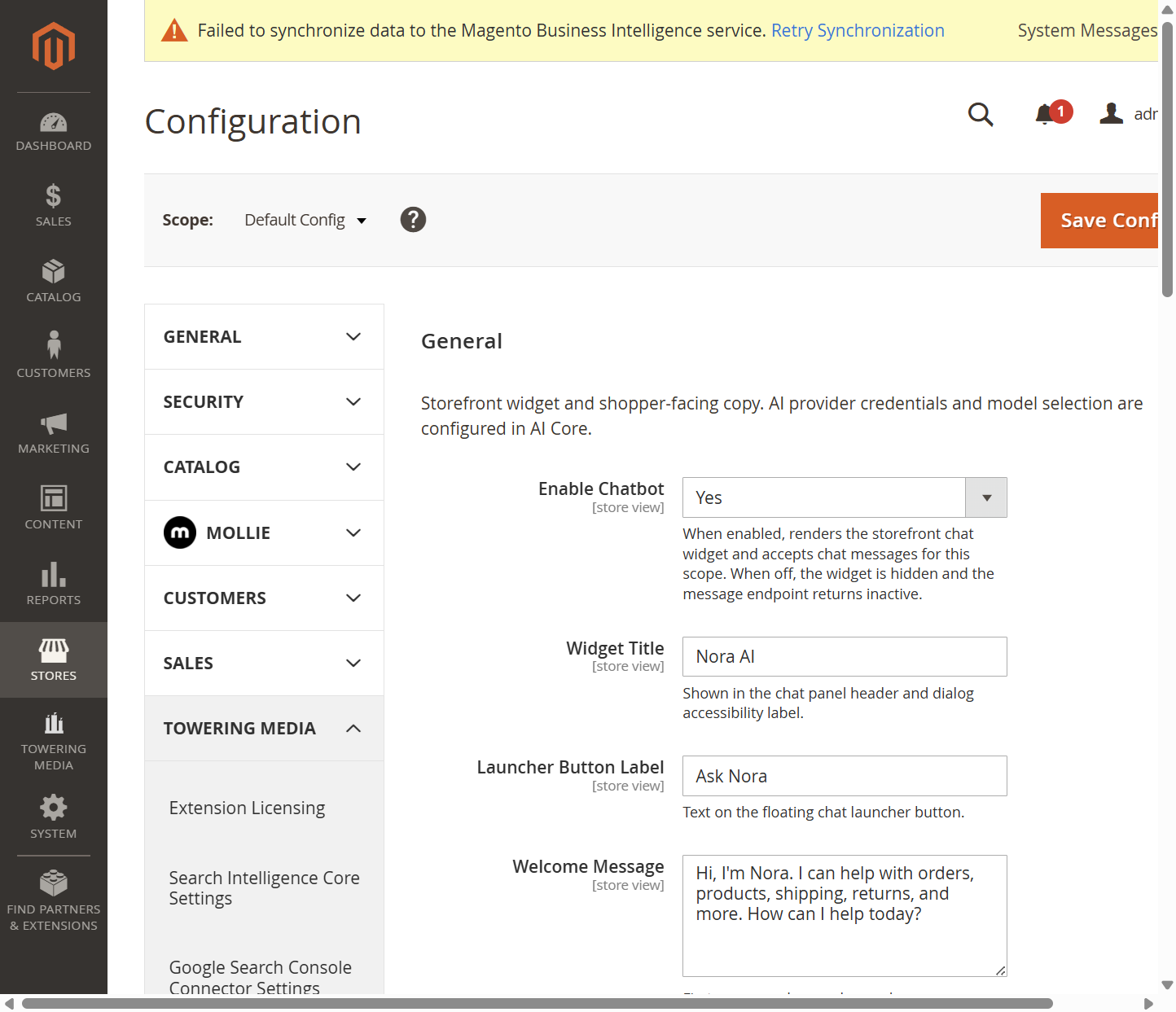
All Nora settings live under Stores → Configuration → Towering Media → Nora AI. Each section is scoped per store view so you can run different widget copy, voice settings, or escalation behavior across multiple stores from a single admin.
- ✓ General — enable/disable widget, title, launcher label, and welcome copy
- ✓ Widget Appearance — colors, subtitle, launcher style, unread badge
- ✓ Voice (mic & read-back) — enable voice input and spoken replies (STT/TTS configured in AI Core)
- ✓ Escalation & Handoff — human takeover triggers, timeout, support email
- ✓ Security & Limits — guest chat toggle, message length cap
- ✓ Agent Hunter — mobile PWA token and web push (VAPID) key generation
Widget Copy & Behavior
Customize Every Shopper-Facing String
The General settings section gives you full control over what shoppers read in the chat panel. Change the widget title, launcher button text, welcome message, guest hint, and every fallback reply — all scoped per store view. Your AI provider credentials stay in AI Core and never need touching here.
- ✓ Widget Title and Launcher Label — match your brand voice
- ✓ Welcome Message — first message shown when no transcript exists yet
- ✓ Help Notice — optional hint below the message area (guest vs signed-in)
- ✓ Fallback replies for empty input, unavailable service, and error states

Human Escalation & Live Chat
Seamless Handoff to Your Support Team
When a shopper asks to speak with a person, Nora queues an escalation and pauses AI replies for that session. Your team sees the open chat in the Live Chat workspace, claims it with one click, and replies directly. The shopper widget updates in real-time without a page reload.
- ✓ Explicit trigger phrases and AI intent scoring detect handoff requests
- ✓ First-claim-wins atomic claim prevents double-takes
- ✓ Unanswered timeout: widget asks shopper for name + email if no agent replies in time
- ✓ Store receives email with shopper contact details when timeout triggers
- ✓ Resolved chats are reviewed by AI and may generate Knowledge Base draft entries
Agent Hunter — Mobile PWA
Claim and Reply From Your Phone
Agent Hunter is a mobile-first PWA for support staff who aren't at a desktop. Generate a bearer API token in admin, open the app on any phone at /tm_chatbot/agent/app, add to home screen, and go on duty. When an escalation arrives, claim it and reply from the mobile interface — same atomic claim and reply services as the desktop Live Chat.
- ✓ Bearer token generated in one click — shown once, treated like a password
- ✓ Add-to-home-screen PWA — no app store install needed
- ✓ Web Push (VAPID) alerts when Agent Hunter is closed on the phone
- ✓ On-duty toggle — only receive alerts when you're actively available
- ✓ Revoke tokens by removing the row in admin — no code change needed

Three Tiers of Customer Support — Built In
Nora handles the work that doesn't need a human. When it does, the path to a person is frictionless.
AI-First Replies
Nora reads your CMS, catalog, and live Magento data to answer product, policy, shipping, and order questions in real-time — no FAQ database to maintain.
Human Escalation
One phrase — "I want to talk to someone" — queues the chat for your team. Agents claim and reply from desktop Live Chat or Agent Hunter on their phone.
Contact Capture
If no agent replies within the timeout window, the widget asks the shopper for name and email. The store receives an email so the team can follow up asynchronously.
Questions about Nora AI or getting it set up?
Tell us your Magento version, whether you already have AI Core, and any specific support workflows you need. We reply within one business day.
Key Features
Storefront AI chat with Magento-grounded answers, human escalation, and optional mobile agent tools.
- Floating chat widget Branded launcher and panel with per-store-view copy.
- Catalog and CMS answers Reads live Magento catalog, CMS, and store config.
- Order-aware help Signed-in shoppers get read-only status and tracking.
- Live Chat escalation Shoppers request a person; agents claim and reply.
- Agent Hunter PWA Claim the queue from a phone with push alerts.
- Optional voice mode Mic input and spoken replies when voice is enabled.
- Widget appearance Colors, launcher style, subtitle, and unread badge.
- Knowledge Base drafts Unresolved gaps can become answers you approve later.
Demo
Docs & Support
📘 Documentation
Nora AI is designed for quick deployment and straightforward configuration within Magento 2. The extension includes the settings needed to connect your storefront with the AI assistant and customize the customer experience.
- Extension installation and setup
- AI assistant configuration options
- Store policy and knowledge base integration
- Customer account and order-aware assistance setup
- Support handoff and escalation configuration
See docs/MERCHANT_GUIDE.md in the toweringmedia/module-nora-ai package for merchant setup, voice, escalation, and storefront configuration.
💬 Support
Need assistance with Nora AI? Our Magento experts are available to help with installation, configuration, and optimization.
- Installation and setup assistance
- Configuration guidance and best practices
- Knowledge base and policy integration support
- Troubleshooting and issue resolution
- Extension updates and compatibility assistance
Reviews
Frequently Asked Questions
What does the Nora AI Chatbot Extension for Magento 2 do?
Nora AI adds an AI-powered chat assistant to Magento 2 storefronts. It helps customers with product information, store policies, and general questions. Signed-in customers can access read-only information about their own orders. The extension also includes human escalation, Magento admin Live Chat, and optional Agent Hunter mobile support.
Can Nora AI answer customer questions using my Magento product catalog?
Yes. Nora AI uses Magento catalog, CMS, and store information through controlled retrieval tools to help answer product and policy questions. The accuracy and completeness of replies depend on the information available and the configured AI provider.
Can customers check their order status and tracking information through Nora AI?
Yes. Authenticated Magento customers can ask Nora about their own orders, including status, summaries, and available shipment tracking details. Order access is read-only, and guest visitors cannot retrieve private customer order information through this functionality.
Does Nora AI support live chat with human customer service agents?
Yes. Nora AI includes a human escalation workflow. When a shopper requests a person, the conversation can enter the Magento admin Live Chat queue. Authorized agents can claim the conversation, send replies directly to the storefront widget, and mark the chat as resolved.
What is Agent Hunter in the Nora AI Magento 2 extension?
Agent Hunter is an optional mobile Progressive Web App for support agents. It allows authorized staff to go on duty, review incoming chat escalations, claim conversations, send replies, and resolve requests from supported mobile devices. Web Push notifications are available when device permissions and push credentials are properly configured.
Does Nora AI require Toweringmedia AI Core?
Yes. Nora AI requires Toweringmedia AI Core and Toweringmedia Base. These are Composer dependencies, and AI Core is included with the Nora package rather than requiring a separate Core AI license. Configure the AI provider and model under Stores → Configuration → Toweringmedia → AI Core before enabling live AI responses.
Where do I enable and configure Nora AI in Magento 2?
Go to Stores → Configuration → Toweringmedia → Nora AI → General and set Enable Nora to Yes for the required store view. The same configuration area provides widget appearance, customer-facing messages, escalation and handoff, guest access, and security settings.
Can Nora AI collect customer contact details when a support agent is unavailable?
Yes. When a human escalation remains unanswered beyond the configured timeout, Nora can request the shopper's name and email and send the details to the store's support inbox. Separate knowledge-gap settings can also collect contact information for unanswered questions and notify administrators.
Can I customize the Nora AI chatbot appearance and enable voice assistance?
Yes. Magento administrators can customize the widget title, launcher label, welcome message, colors, and other appearance options. Nora also provides optional microphone input and spoken replies when the relevant speech services are configured in Toweringmedia AI Core.
Is Nora AI compatible with Magento Open Source, Adobe Commerce, and Hyvä?
Nora AI is marketed for Magento 2.4.x Open Source and Adobe Commerce installations. Its storefront widget uses standalone styling and supports configurable theme colors. The merchant documentation does not identify a separate Hyvä-specific theme package, so merchants using customized Hyvä storefronts should verify the widget's rendering and behavior in their theme before production deployment.
Technical Specifications
- Magento Version: Compatible with Magento 2.4.x (Open Source & Adobe Commerce)
- Edition: Magento Open Source & Adobe Commerce
- Package Name: toweringmedia/module-nora-ai
- Module Dependency: Requires Toweringmedia Base (toweringmedia/module-base) and AI Core (toweringmedia/module-ai-core)
- Extension Type: AI-powered storefront assistant
- Installation Type: Composer package installation
- Core Feature: Storefront AI chat assistant
- Product Assistance: Answers customer questions about products and store information
- Policy Assistance: Provides guidance based on store policies and FAQs
- Order-Aware Support: Supports personalized assistance for signed-in customers
- Human Handoff: Escalates conversations to support staff when required
- Customer Login Support: Yes
- Guest User Support: Yes
- Frontend Integration: Embedded Magento storefront assistant
- Support Workflow: AI-assisted responses with human escalation
- Use Cases: Product discovery, policy assistance, customer support, and order help
- Vendor: Toweringmedia
- License Type: Licensed Magento 2 extension
- Documentation: User guide currently not available
- Support: Provided by the Toweringmedia Magento support team
- Deployment: Suitable for Magento storefront customer engagement and support automation
Compatible with your Magento 2 store
Built for Magento 2.4.x with PHP 8.1–8.4. Core AI is included at no extra cost. Install via Composer as toweringmedia/module-nora-ai.
-
 Magento 2.4.x
Open Source & Adobe Commerce
 Updates & supportKeep your store running smoothly