
Moneris Payment Gateway for Magento 2 — Luma, Hyvä & React Checkout Pro
- Community
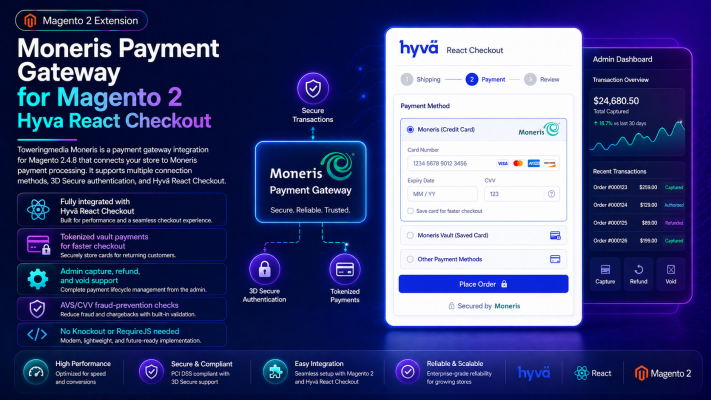
The complete Moneris payment solution for Magento 2 — production-validated on Luma, Hyvä-theme, and React Checkout Pro. Accept cards, Apple Pay, Google Pay, and saved-card vault payments with hosted tokenization, EMV 3DS, and built-in sandbox testing.
- Multi-checkout: Luma, Hyvä-theme stores, and React Checkout Pro — one module, one gateway
- Apple Pay & Google Pay express wallets (Moneris direct lane)
- Saved cards / vault — fully shipped, not “coming soon”
- Hosted tokenization for reduced PCI scope
- EMV 3-D Secure 2 (3DS2) with configurable risk enforcement
- Magento 2.4.7 / 2.4.8 · PHP 8.1, 8.2, 8.3
The Problem
- ✖ Standard payment setups may lack smooth Moneris support in Magento 2
- ✖ Checkout friction can increase cart abandonment and failed payments
- ✖ Merchants need secure transactions with modern checkout compatibility
- ✖ Hyvä and React Checkout stores require optimized gateway integration
The Solution
Toweringmedia Moneris Payment Gateway delivers secure Moneris transactions with seamless Magento 2, Hyvä, and React Checkout compatibility for a faster payment experience.
How It works
See It In Action
Moneris Payment Gateway for Magento 2 — Luma, Hyvä & React Checkout Pro
The first Moneris payment module built for the modern Magento 2 ecosystem. Accept cards, Apple Pay, Google Pay, and saved-card vault payments on stock Luma checkout, Hyvä-theme stores, and React Checkout Pro — all from a single module sharing one server-side gateway. Sandbox testing, hosted tokenization, and EMV 3DS included. Composer-installable; annual license.
Why Choose Toweringmedia Moneris Gateway?
The Problem
Most Moneris extensions for Magento 2 target only the classic Luma checkout — or bolt onto a single theme. If your store runs on the Hyvä theme or React Checkout Pro, you need a payment module that is tested and production-validated on all three platforms. And if a competitor lists saved cards as "coming soon," that feature isn't there when you need it.
The Solution
Toweringmedia Moneris Gateway v1.5.0 is production-validated on every major Magento 2 checkout: stock Luma/Knockout.js, Hyvä-theme stores on native checkout, and React Checkout Pro. One module. One gateway contract. Three checkout platforms. Vault/saved cards ship in v1.5.0 and work on all three — fully, today.
How It Works
Step 1 — Install via Composer
Add the package to your Magento 2 store with composer require toweringmedia/module-moneris. Run setup:upgrade, setup:di:compile, and cache:flush. No manual file editing or file-copy steps required.
Step 2 — Configure your Moneris credentials
Enter your Moneris Store ID and API Token under Stores → Configuration → Sales → Payment Methods → Toweringmedia Moneris. Toggle between Moneris QA (sandbox) and production with a single setting. Configure AVS/CVD risk enforcement, 3DS mode (Off / Attempt / Require), hosted tokenization, and wallet settings as needed. Admin test buttons let you verify your credentials and Hosted Profile ID before going live.
Step 3 — Go live
Deploy static content, switch to your production Moneris credentials, and you're accepting payments. Apple Pay and Google Pay require a one-time domain verification and certificate upload — full setup instructions are in the included User Guide and docs/WALLETS_SETUP.md. Saved-card vault works immediately for logged-in customers once the module is configured.
Features
Multi-Checkout Support — One Module, Three Platforms
- Stock Magento Luma / Knockout.js checkout — Production-validated card form renderer, saved-card vault, and clean fail-close behavior in 3DS Require mode.
- Hyvä-theme stores (native checkout / Luma-compat) — Production-validated on Hyvä-themed storefronts using Magento's native checkout. No Hyvä Checkout (Magewire) license required.
- React Checkout Pro — Deep integration via the checkout-agnostic Toweringmedia Moneris SDK. Supports cards, vault, Apple Pay, Google Pay, and the full EMV 3DS challenge flow.
Apple Pay & Google Pay Express Wallets
- Apple Pay and Google Pay via the Moneris direct lane — no redirect to a Moneris-hosted payment page.
- Wallet transactions processed as
cavv_purchase/cavv_preauthwith a Moneris wallet indicator (APW / GPW). - Google Pay uses
DIRECTtokenization (merchant-side decryption with your own EC P-256 keys). - Apple Pay requires a Merchant Identity Certificate and a Payment Processing Certificate — full Apple Developer and Moneris setup guide included.
- Independent admin toggles to enable or disable each wallet.
- Fulfillment-aware wallet placement for React Checkout Pro + fulfillment add-ons (Store Pickup, Local Delivery): wallets shift to the payment section after fulfillment is resolved.
Saved Cards / Vault — Fully Shipped
- Logged-in customers save their Moneris card token at checkout and reuse it on future orders — no card re-entry required.
- Vault works across all three checkout platforms: Luma, Hyvä-theme, and React Checkout Pro.
- Raw PANs are never persisted. Tokens are returned by Moneris Hosted Vault and stored against the Magento customer account.
- "Save card for next time" checkbox shown at checkout to logged-in customers when vault is enabled.
- Saved-card selector in the checkout payment form for customers with existing tokens.
Hosted Tokenization — Reduced PCI Scope
- Card fields rendered inside a Moneris-hosted HPPtoken iframe — card data never touches your server or Magento database.
- Reduces your PCI DSS scope by keeping sensitive card numbers off your infrastructure.
- CSP rules for the Moneris HPPtoken iframe origins (
https://esqa.moneris.comsandbox,https://www3.moneris.comproduction) are pre-configured incsp_whitelist.xml. - Configure with your Hosted Profile ID (
ht…) from the Moneris Merchant Resource Centre.
EMV 3-D Secure 2 (3DS2)
- Full EMV 3DS 2.x flow via Moneris Gateway XML + the MPI2 servlet:
card_lookup→threeds_authentication→cavv_lookup. - Configurable enforcement mode per store: Off, Attempt, or Require.
- Full 3DS challenge iframe wired into React Checkout Pro (challenge flow, redirect handling, CAVV capture).
- Luma checkout in Require mode fails closed with a user-visible message — 3DS challenge UI for Luma is a tracked follow-up.
- Supports
res_cavv_purchase_cc(Authorize & Capture) andres_cavv_preauth_cc(Authorize Only / capture later).
Risk Controls — AVS & CVD
- Address Verification System (AVS) and Card Verification Data (CVD) enforcement rules configurable per store.
- Options: Allow or Decline on AVS/CVD mismatch — no silent bypasses.
- Correct nested CVD structure for tokenized transactions, including 2-byte CVD code normalization.
Admin Order Management
- Online capture from the Magento admin for Authorize Only payment action.
- Online refund via Moneris
refundand purchase correction (purchasecorrection). - Admin credential test buttons — test your direct gateway credentials and Hosted Profile ID from the configuration screen before going live.
Sandbox & Production
- Full Moneris QA (sandbox) environment support — toggle with a single admin setting, no config file changes.
- Moneris sandbox test card numbers and expected AVS/CVD/3DS results documented in the User Guide.
- Separate Store ID / API Token fields for QA and production so you can keep test credentials on hand.
Documentation & Support
A comprehensive User Guide is included with every license. It covers:
- Composer installation and setup:upgrade flow
- Gateway credential configuration (QA vs. production, Store ID, API Token)
- Hosted Tokenization setup: Hosted Profile ID (
ht…), iframe loading, and CSP configuration - Apple Pay: Merchant Identity Certificate, Payment Processing Certificate, domain verification file, and Moneris Business Console setup
- Google Pay: DIRECT tokenization, P-256 EC keypair, Business Console domain approval
- 3DS mode selection and Moneris MPI2 test card flows
- Vault / saved-card enabling and per-customer testing steps
- AVS/CVD enforcement options and expected gateway responses
- Sandbox test cards with expected outcomes (purchase, refund, 3DS)
- Troubleshooting: "Generate a Moneris token" error, HPPtoken iframe blocked by CSP, Apple Pay PEM decryption, and more
Your annual license includes documentation access and direct support from the Toweringmedia development team.
Frequently Asked Questions
Which checkout platforms does this work with?
The module is production-validated on three Magento 2 checkouts: stock Luma / Knockout.js checkout, Hyvä-theme stores running native checkout (Luma-compat mode), and React Checkout Pro. All three share the same server-side gateway — one module, one transaction pipeline.
Do saved cards (vault) really work?
Yes. Vault is fully implemented and production-validated in v1.5.0, working on all three checkout platforms. Logged-in customers can save a card at checkout and reuse it on future orders with a single click. Moneris Hosted Vault tokens are stored against the Magento customer account; raw PANs are never persisted. This is not "coming soon."
How do Apple Pay and Google Pay work?
Apple Pay and Google Pay run on the Moneris direct lane — no redirect to a Moneris-hosted page. Apple Pay requires a Merchant Identity Certificate and a Payment Processing Certificate from Apple, plus domain verification (apple-developer-merchantid-domain-association). Google Pay requires a Merchant ID, a DIRECT-type EC P-256 keypair from the Google Pay Business Console, and domain registration approval. Full setup instructions are in the included User Guide.
What Magento versions and PHP versions are supported?
Magento 2.4.7 and 2.4.8 (including all patch releases). PHP 8.1, 8.2, and 8.3.
Does this support Hyvä Checkout (Magewire)?
Hyvä Checkout — the standalone commercial checkout product from Hyvä (distinct from the Hyvä theme) — has a code-complete Magewire adapter included in v1.5.0 that ships dormant. It requires a separate licensed Hyvä Checkout installation. Full end-to-end validation on a Hyvä Checkout sandbox is pending; it is not considered production-ready until that is confirmed. Hyvä-theme stores using native checkout are fully supported and production-validated today.
Does 3DS work on Luma checkout?
The non-3DS direct-card path is fully implemented on Luma checkout. In 3DS Require mode on Luma checkout, the module fails closed with a clear user-visible message (the 3DS challenge UI for Luma is a tracked follow-up). The full 3DS challenge flow — including the challenge iframe and CAVV capture — is wired into React Checkout Pro today.
What is the licensing model?
This is proprietary software sold with an annual license. Your license includes the Composer package via composer.toweringmedia.com, the User Guide, and support access. Contact Toweringmedia for multi-store or agency licensing inquiries.
Technical Specifications
| Magento versions | 2.4.7, 2.4.8 (including p-releases) |
|---|---|
| PHP versions | 8.1, 8.2, 8.3 |
| Module version | 1.5.0 |
| Package | toweringmedia/module-moneris |
| Gateway protocol | Moneris Gateway XML (single <request> endpoint) |
| Checkout support | Luma, Hyvä-theme (native checkout), React Checkout Pro |
| Wallets | Apple Pay, Google Pay (Moneris direct lane) |
| Vault / Saved cards | Yes — all checkout platforms |
| Hosted tokenization | Yes — Moneris HPPtoken iframe |
| 3DS | EMV 3DS 2.x (Off / Attempt / Require) |
| AVS / CVD | Yes — Allow or Decline enforcement |
| Payment actions | Authorize & Capture, Authorize Only (capture later) |
| Admin operations | Online capture, refund, void (purchase correction) |
| Install method | composer require toweringmedia/module-moneris |
| License | Proprietary — annual license required |
Ready to Go?
Add to cart and complete checkout to receive your Composer credentials, User Guide access, and license key. Have questions before purchasing? Contact Toweringmedia — we're happy to walk through your store's checkout setup before you buy.
The complete Moneris payment solution for Magento 2 — production-validated on Luma, Hyvä-theme, and React Checkout Pro. Accept cards, Apple Pay, Google Pay, and saved-card vault payments with hosted tokenization, EMV 3DS, and built-in sandbox testing.
- Multi-checkout: Luma, Hyvä-theme stores, and React Checkout Pro — one module, one gateway
- Apple Pay & Google Pay express wallets (Moneris direct lane)
- Saved cards / vault — fully shipped, not “coming soon”
- Hosted tokenization for reduced PCI scope
- EMV 3-D Secure 2 (3DS2) with configurable risk enforcement
- Magento 2.4.7 / 2.4.8 · PHP 8.1, 8.2, 8.3
📘 Documentation
Get started quickly with our detailed user guide. The documentation covers everything from installation to advanced Moneris gateway configuration and checkout integration.
- Step-by-step installation instructions
- Configure Moneris credentials and sandbox / production mode
- Enable Magento, Hyvä, and React Checkout compatibility
- Payment testing, transaction flow, and troubleshooting
- Best practices for secure checkout performance
💬 Support
Need help? Our Magento experts are here to assist you with setup, configuration, and troubleshooting.
- Quick and reliable email support
- Help with installation and Moneris setup
- Troubleshooting payment and checkout issues
- Guidance for Hyvä and React Checkout integration
- Regular updates and Magento compatibility support
The extension connects your Magento 2 store with Moneris so you can accept secure online card payments through a trusted Canadian payment gateway.
Yes, the module is built to support Magento 2 default checkout, Hyvä themes, and React Checkout for a smooth modern payment experience.
Yes, you can use Moneris test or sandbox credentials to verify checkout, transaction flow, and configuration before enabling live payments.
Yes, the gateway supports secure payment processing while Magento records orders, payments, and transaction details for easy management.
- Magento Version: Compatible with Magento 2.4.x (Open Source & Adobe Commerce)
- PHP Version: PHP 7.4, 8.1, 8.2, 8.3 compatible
- Framework: Built using Magento 2 native architecture (no core overrides)
- Installation Type: Composer / Manual installation supported
- Module Dependency: Valid Moneris merchant account required
- Payment Gateway: Moneris
- Payment Methods: Credit and debit card processing via Moneris
- Mode Support: Sandbox / Test and Production mode
- Transaction Type: Authorize, Capture, Sale based on configuration
- Security: Encrypted payment communication
- Checkout Compatibility: Magento default checkout, Hyvä, React Checkout
- Multi-Store Support: Yes
- Store Scope Configuration: Website / Store View level
- Order Management: Integrated with Magento order workflow
- Cron Support: Fully compatible with Magento cron jobs
- Admin Configuration Path: Stores → Configuration → Sales → Payment Methods → Moneris
- Logging: Payment logs and transaction debugging support
- Performance Impact: Minimal and optimized implementation
- Use Cases: Canadian merchants using Moneris payment services