
Magento 2 Resource Center Extension


- Community
The Problem
- ✖ Customers struggle to find manuals, buying guides, and technical documentation before purchasing
- ✖ Standard Magento CMS pages and blogs are not designed for structured educational content or equipment libraries
- ✖ Technical resources become difficult to organize, search, and maintain as product catalogs grow
- ✖ Poor access to product education increases support requests, wrong purchases, and product returns
The Solution
The Magento 2 Resource Center Extension creates a dedicated knowledge hub inside your Magento store, allowing you to organize manuals, buying guides, FAQs, how-to articles, and technical documentation into searchable category libraries with SEO-friendly pages, structured schema, related products, and a fully Magento-native admin experience.
How It works
See It In Action
Magento 2 Resource Center
A Magento-native educational library for manuals, parts ID guides, how-tos, and equipment research — organized by topic so shoppers identify the right product before they buy. Built for merchants who need a content hub, not another blog.
Storefront Library
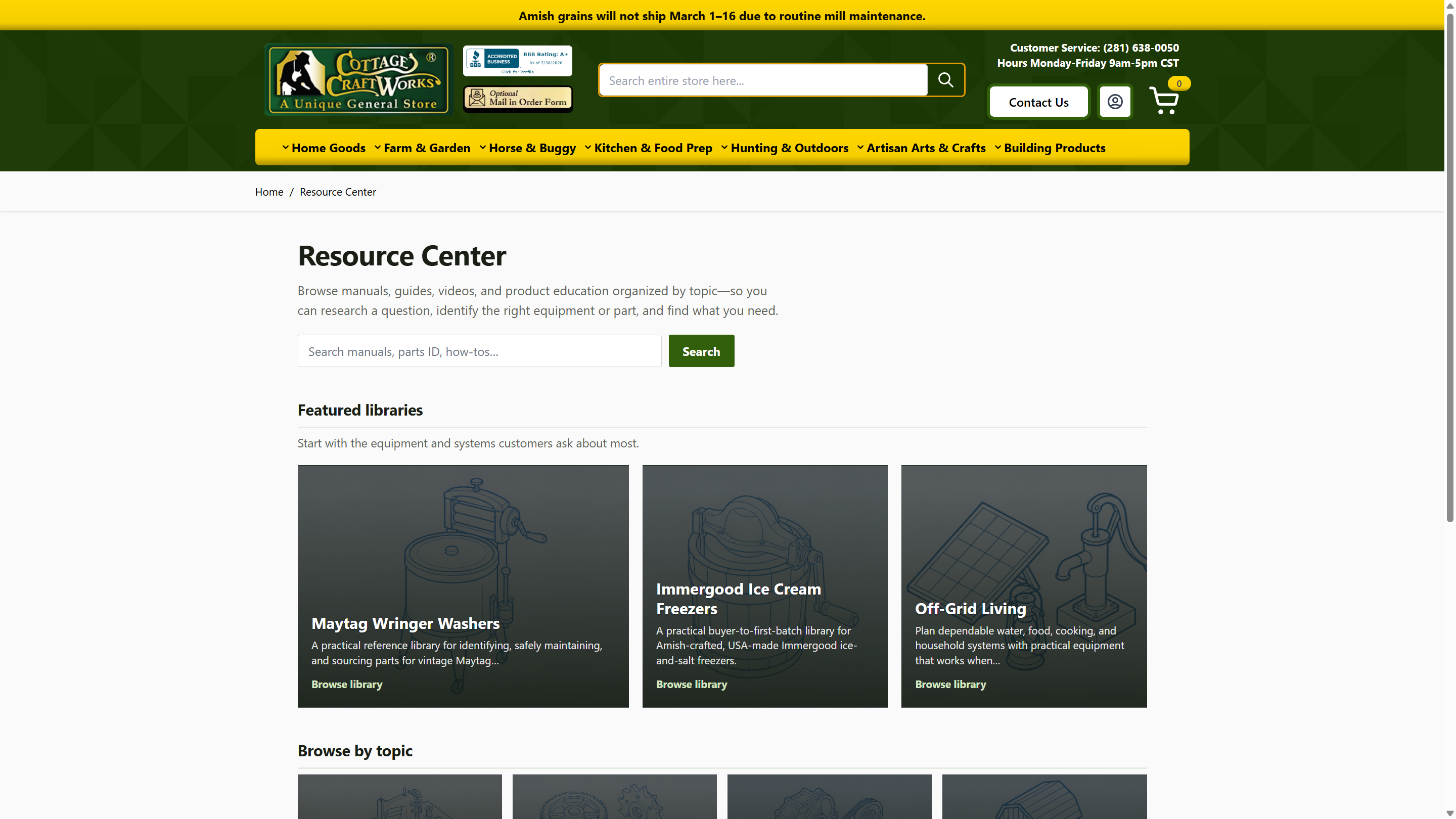
Topic Libraries Shoppers Actually Use
The Resource Center landing page presents featured libraries and browse-by-topic tiles with search built in. Each category becomes a focused library — New Holland parts, Maytag wringer washers, off-grid systems — so customers research fitment and procedure before they hit Add to Cart.
- ✓ Configurable
/resource-centerroute with breadcrumbs and sitemap - ✓ Featured libraries + topic grid for fast discovery
- ✓ In-library search for manuals, parts ID, and how-tos
- ✓ Hyvä-friendly templates that match modern Magento storefronts
Equipment Libraries
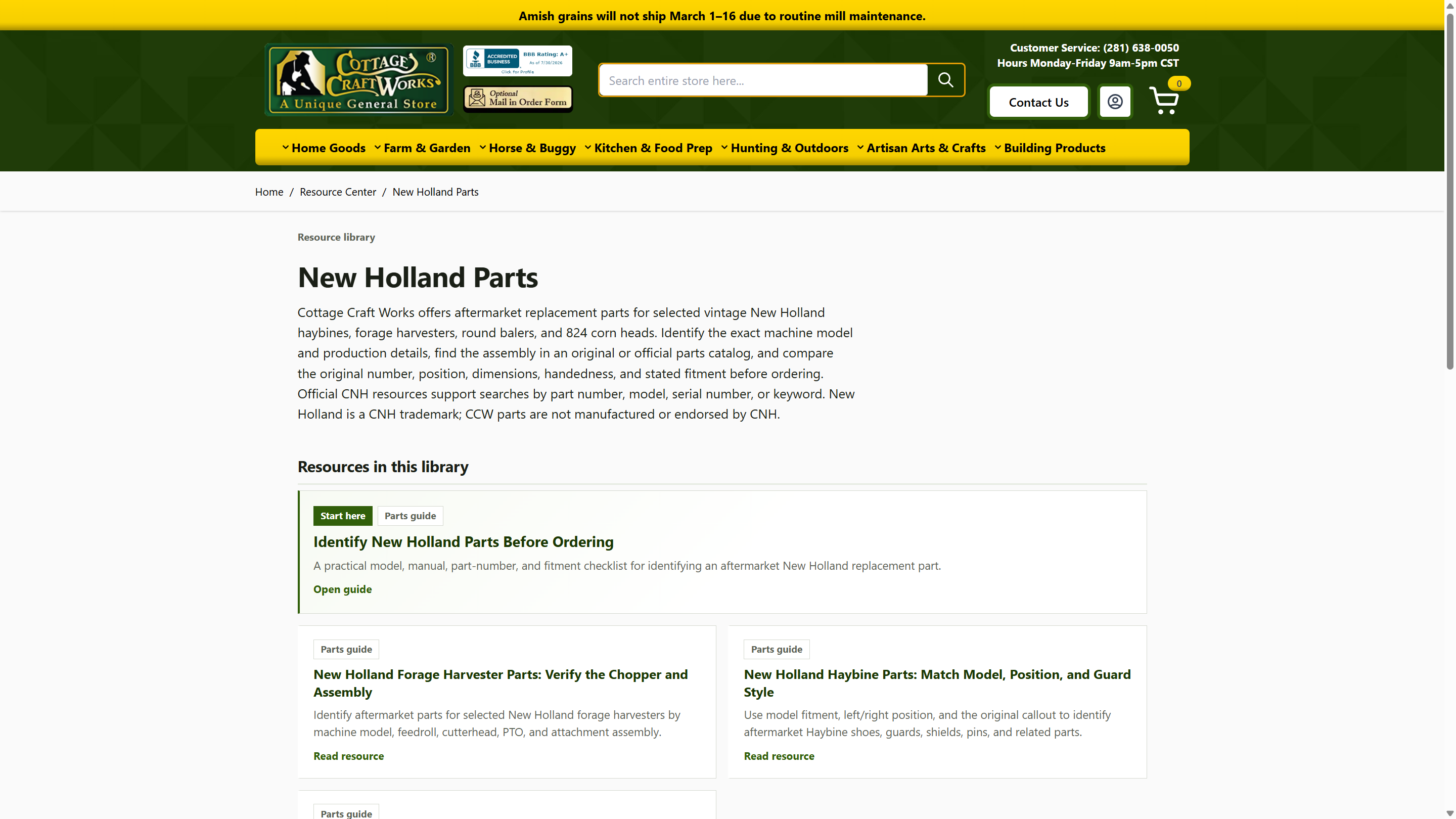
Nested Categories Built for Parts & Procedures
Unlimited nested categories let you model real equipment families — not flat blog tags. Merchants control name, slug, short description, SEO/AEO fields, and hierarchy so each library reads like a specialist desk, not a news feed.
- ✓ Parent/child category trees with active flags and sort order
- ✓ Tile blurbs for landing cards, separate from AEO summary fields
- ✓ Resource cards with tags, excerpts, and clear CTAs
- ✓ Ideal for aftermarket parts, manuals, and how-to education
Structured Guides
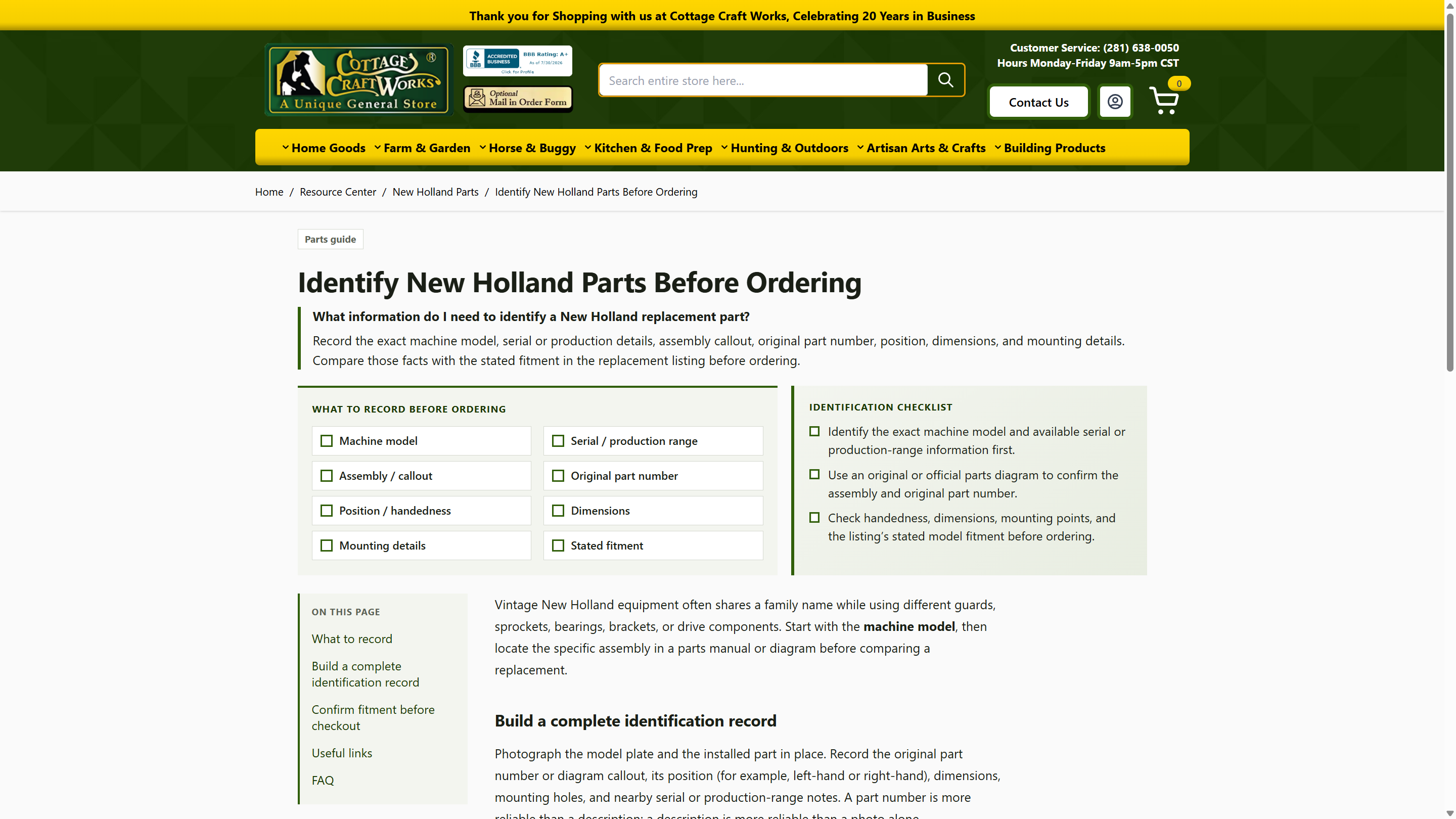
Checklists, FAQs, and SEO Schema — Not Just HTML
Each resource supports structured merchant fields: schema type (Article / HowTo / Guide), takeaways, primary question, FAQs, assets, related products, and related resources. Shoppers get on-page navigation and actionable checklists; search engines get meaningful JSON-LD.
- ✓ Schema Type drives JSON-LD (Guide, HowTo steps, Article)
- ✓ Takeaways, primary question, and FAQ blocks for AEO
- ✓ PDFs, videos, external links, and related catalog products
- ✓ Publish scheduling, featured flags, and sort order
Merchant Admin
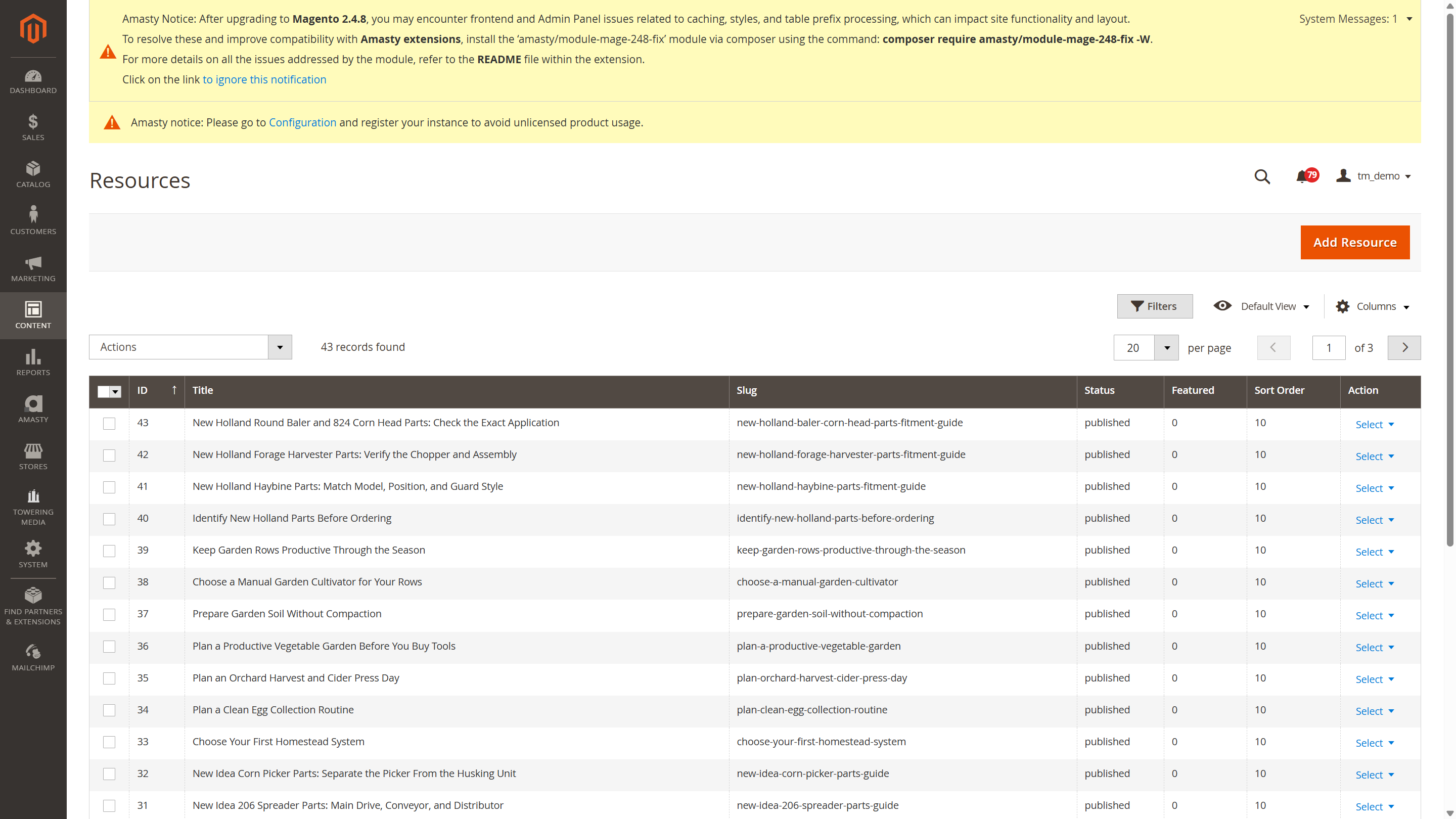
Manage Libraries Without Leaving Magento
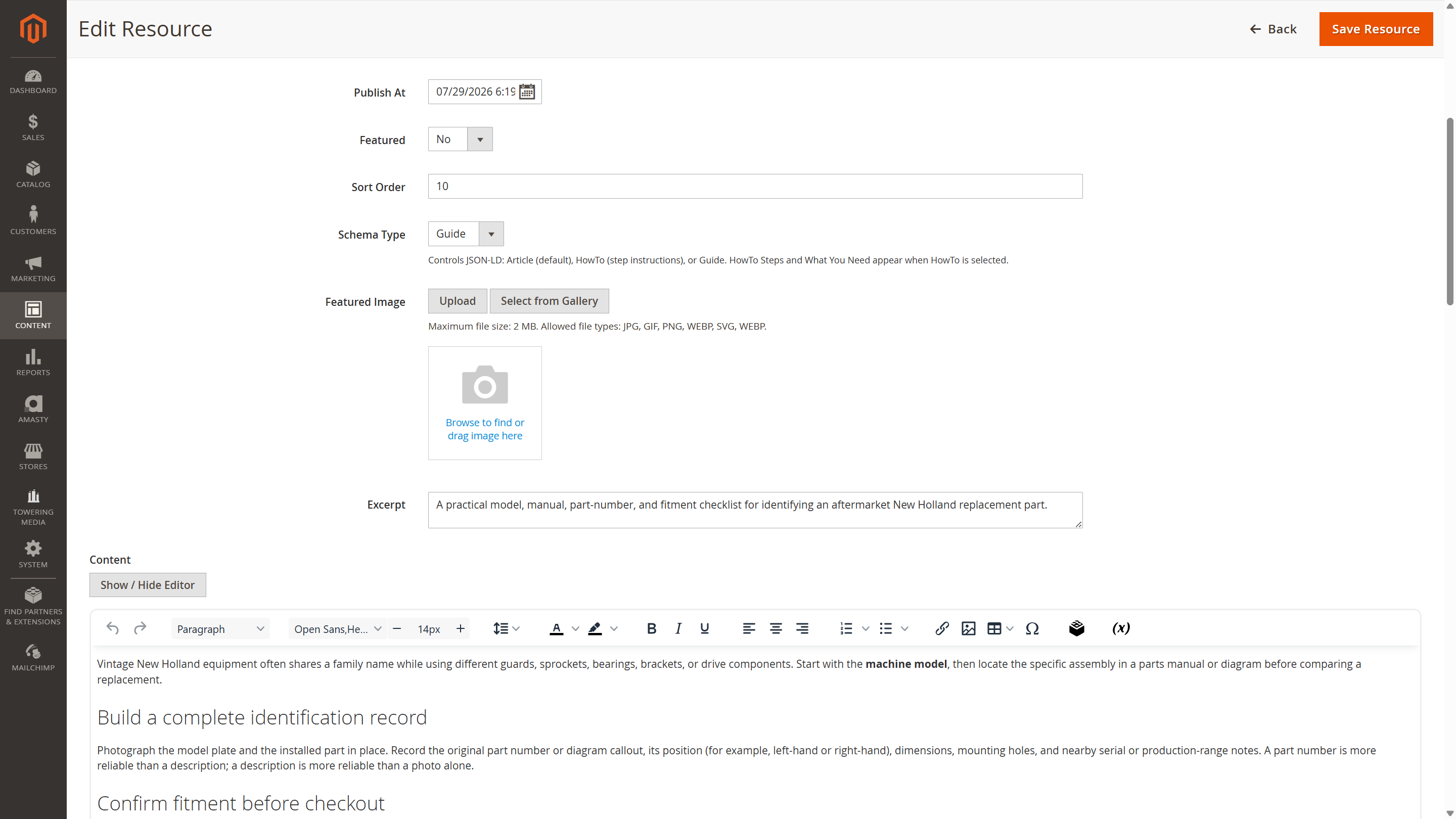
Resources and categories live under Content → Resource Center. Editors get Magento-native grids and forms — title, slug, status, publish date, schema type, featured image, excerpt, rich content, SEO, and structured fields — no separate CMS silo.
- ✓ Resource list with filters, status, featured, and sort order
- ✓ Category edit with hierarchy, tile blurb, and SEO/AEO fields
- ✓ Stores → Configuration → Toweringmedia → Resource Center
- ✓ Requires
toweringmedia/module-basefor licensing and hub discovery
Admin Editing
Structured Fields Merchants Can Fill
Resource edit is more than a WYSIWYG blob. Schema type, excerpt, takeaways, meta fields, and primary question sit beside content so marketing and SEO can maintain educational pages without developer tickets for every update.
- ✓ Guide / HowTo / Article schema selector with field gating
- ✓ Featured image upload or media gallery select
- ✓ Meta title, description, keywords, robots, canonical override
- ✓ Designed for equipment education — reduce wrong-part returns
What You Get
Extension license for the module. Demo content and client-specific library seeding are separate sellable services.
Module License
Composer package toweringmedia/module-resource-center with annual license delivery via My Extensions / Composer auth.
Storefront + Admin
Landing, category, resource, and search templates plus Magento admin grids for resources and categories.
Content Seeding (Optional)
CCW-style equipment libraries, copy, and assets can be seeded as a separate project — not included in the base license.
Requirements
- ✓ Magento 2.4.x / PHP 8.1+
- ✓
toweringmedia/module-base - ✓ Hyvä Themes recommended for the included storefront experience (Luma not the primary target)
- ✓ Live demo: staging.cottagecraftworks.com/resource-center
Need a seeded equipment library for your catalog?
Tell us your Magento version, Hyvä status, and whether you need content seeding. We reply within one business day.
📘 Documentation
Comprehensive documentation helps you quickly install, configure, and manage your Magento 2 Resource Center, from creating libraries to publishing educational content.
- Step-by-step installation and upgrade guide
- Create and organize resource categories and nested libraries
- Manage guides, articles, FAQs, and educational resources
- Configure SEO, schema, search, and storefront settings
- Best practices for building an effective product knowledge hub
💬 Support
Our Magento specialists are ready to help with installation, configuration, upgrades, and troubleshooting to ensure your Resource Center performs at its best.
- Fast and reliable technical support
- Installation and configuration assistance
- Help organizing resource libraries and categories
- Support for SEO, schema, and storefront customization
- Ongoing updates and Magento compatibility support
The Magento 2 Resource Center Extension creates a dedicated knowledge hub inside your Magento store where customers can browse manuals, buying guides, FAQs, how-to articles, technical documentation, and other educational resources before making a purchase.
You can publish buying guides, product manuals, installation instructions, FAQs, troubleshooting articles, maintenance procedures, checklists, parts identification guides, videos, PDFs, and other educational content with related products and downloadable resources.
Yes. The extension includes SEO-friendly URLs, meta fields, canonical URLs, JSON-LD schema (Article, Guide, and HowTo), structured FAQs, breadcrumbs, XML sitemap support, and search engine optimized resource pages.
Yes. The Resource Center is built with Hyvä-compatible storefront templates to provide a fast, modern browsing experience. Magento 2.4.x with PHP 8.1+ is supported, and the extension requires the toweringmedia/module-base package.
- Magento Version: Compatible with Magento 2.4.x (Open Source & Adobe Commerce)
- PHP Version: PHP 8.1+ compatible
- Framework: Built using Magento 2 native architecture (no core overrides)
- Installation Type: Composer installation
- Module Dependency: Requires toweringmedia/module-base
- Resource Types: Articles, Guides, How-To pages, FAQs, PDFs, Videos, and External Links
- Category Structure: Unlimited parent and child resource categories
- Built-in Search: Search resources by title and content
- Related Products: Supported
- Related Resources: Supported
- SEO Features: Meta tags, canonical URLs, robots, breadcrumbs, and XML sitemap support
- Schema Support: Article, Guide, and HowTo JSON-LD schema
- Publish Scheduling: Supported
- Featured Resources: Supported
- Multi-Store Support: Yes
- Admin Configuration Path: Stores → Configuration → Toweringmedia → Resource Center
- Content Management: Magento-native admin grids and edit forms
- Frontend Compatibility: Hyvä Theme (recommended)
- Performance: Lightweight Magento-native implementation