
Module Installation
Install and validate the extension in a staging environment before deploying to production.
Step 1: Get Composer Credentials
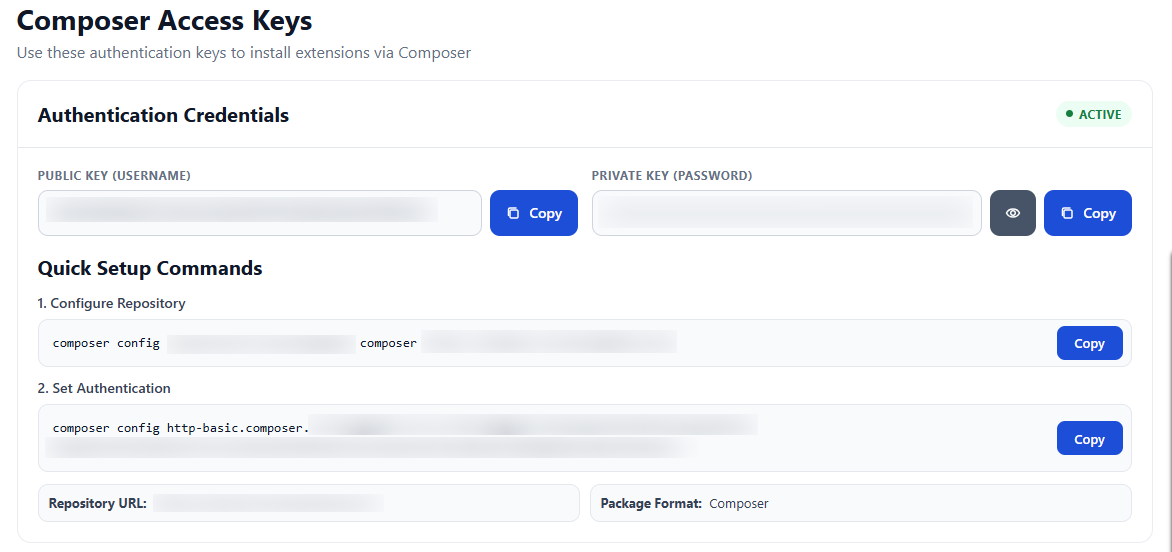
Log in to your Toweringmedia account and navigate to My Extensions to retrieve your Composer credentials. You will find:
- Public Key (Username)
- Private Key (Password)
- Repository URL
- Quick setup commands
Step 2: Configure Composer and Install Package
For example execute the following commands from your SSH terminal:
composer config repositories.toweringmedia composer https://composer.toweringmedia.com/
composer config http-basic.composer.toweringmedia.com <public_key> <private_key>
composer require toweringmedia/module-smtp
Step 3: Run Magento Setup Commands
Run the following commands from your SSH terminal:
php bin/magento setup:upgrade
php bin/magento setup:di:compile
php bin/magento setup:static-content:deploy -f
php bin/magento cache:flush